Ditching your cable TV service really comes down to four moves: figuring out your must-have channels, making the call to cancel, grabbing the right streaming gear, and then using a free online IPTV player to rebuild your TV lineup without the sky-high price tag. It’s all about trading those painful bills and locked-in contracts for genuine flexibility and control.
If the very thought of your next cable bill makes you wince, you’re not alone. You're part of a huge and growing movement. The era of being stuck with bloated, overpriced channel bundles is officially on its way out. People are taking back the remote, driven by a simple desire for fair pricing, real choice, and a TV experience that actually fits their life.
This isn't just some passing fad; it's a massive change in how we watch TV. The decline of traditional cable is pretty staggering. Back in 2010, almost 88% of American households were paying for cable. Today? That number has absolutely cratered.
The main culprit is cost. A whopping 80% of people who make the switch say the constant price hikes are the final straw.
So, what’s the big deal? Why is everyone so eager to make the jump? It’s about more than just saving a bit of cash; it's a whole new way of thinking about entertainment.
Moving away from cable only requires a couple of key things. First is a decent internet connection, which you probably already have. The second is a good streaming device.
While most smart TVs have built-in apps, a dedicated gadget like an Amazon Fire TV Stick usually offers a much faster and smoother experience.
The real game-changer, though, is getting to know technologies like IPTV (Internet Protocol Television). Simply put, IPTV lets you stream live TV channels straight over your internet, completely replacing that clunky old cable box. If you want to dive deeper, you can learn more in our guide that explains what IPTV is and how it works. This is the key to unlocking thousands of channels for a fraction of the cost.
To really see the difference, let’s put the old way and the new way head-to-head.
Looking at the two side-by-side makes the benefits of switching crystal clear. It's a classic case of an outdated model versus a system built for modern viewers.
| Feature | Traditional Cable TV | Modern Streaming (including IPTV) |
|---|---|---|
| Cost | High monthly bills with frequent price increases and hidden fees. | Low-cost or free options; pay only for the services you use. |
| Contracts | Typically requires a 1-2 year commitment with early termination fees. | No long-term contracts; cancel or change services anytime. |
| Content | Bundled packages with hundreds of channels you may never watch. | À la carte selection; build a custom lineup of channels and apps. |
| Hardware | Requires a bulky, rented cable box for each television. | A small, affordable streaming device or just a web browser. |
| Accessibility | Limited to viewing on a television connected to a cable box. | Watch on TVs, smartphones, tablets, and computers, anywhere with internet. |
As you can see, the control shifts entirely back to you. Making the switch is an empowering move, and this guide will walk you through everything you need to know—from surviving the cancellation call with your cable company to getting your new, streamlined entertainment system up and running.
Breaking up with your cable company can feel like a high-stakes negotiation, but it really doesn't have to be a nightmare. The secret is walking into the conversation with a solid plan. Forget the frustration—let's arm you with the right talking points to get through that inevitable chat with their retention department.
This isn't about being confrontational; it's all about preparation. Before you even think about dialing their number, your mission is to understand your current contract, see their sales tactics coming, and have a firm "no" ready for any offer that doesn't get you closer to cutting the cord for good.
The most important work happens before you pick up the phone. You need to gather your intel and build your case. Start by digging up your most recent bill and, if you can find it, your original service agreement.
You're looking for two key pieces of information:
Once you have this info, you’re in the driver's seat. You know what they know, and you can prepare for their arguments. If your contract is already up, the process is way simpler, but you still need to be ready for their last-ditch efforts to keep you.
I've seen it time and time again—even with an early termination fee, the long-term savings from ditching cable more than cover that one-time hit. Do the math yourself. You'll probably be surprised how quickly you come out ahead.
When you call, your first request should be simple and direct: "I would like to cancel my television service." This is the magic phrase that almost always gets you transferred to the retention department—the team whose entire job is to change your mind.
Get ready for their script. They’ll likely dangle a juicy promotional rate, a new channel package, or a fancy bundle with your internet. This is where you have to hold firm. Have your reasons ready and stick to them.
Here's a simple line you can make your own:
"I appreciate the offer, but my decision is final. My budget has changed, and I'm moving to a streaming-only setup that just fits my needs better now. Please go ahead with the cancellation."
Repeat that calmly and confidently. Don't get pulled into a debate about the pros and cons of their service versus streaming. You've already made your choice. The infographic below is a great visual of the logical process you've already completed to get to this point.
This simple guide lays out the process of listing your must-have channels, comparing prices, and checking device compatibility.
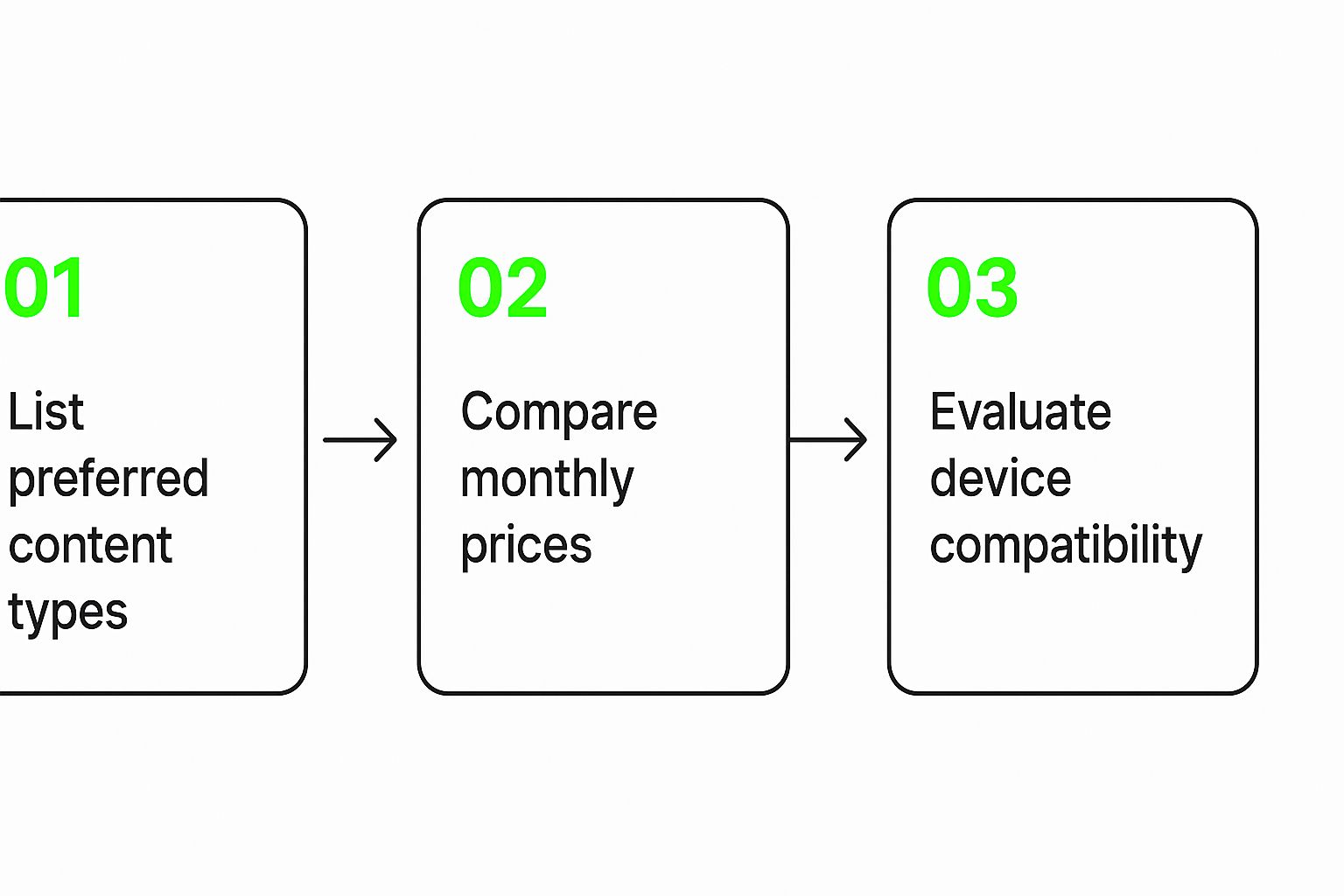
This shows them your decision wasn't just a whim—it was based on a careful evaluation of what works for you.
Once you've navigated the sales pitch and they've agreed to process the cancellation, don't hang up just yet. There are a few critical details to lock down to ensure a clean break without any surprise charges showing up later.
Run through this final checklist before you say goodbye:
Document everything. Jot down the date and time of your call, the rep's name, and that all-important confirmation number. This little bit of paperwork is your safety net if any billing disputes pop up down the road. Follow these steps, and you can confidently and permanently cut that cord.
https://www.youtube.com/embed/3QdhAESQJ1s
Once you've made that final, satisfying call to cancel your cable service, it's time for the fun part: picking the right gear to bring your new streaming world to life. This is where you replace that clunky, rented cable box with a sleek, powerful streaming device that puts you in control.
You might be thinking, "My smart TV already has apps, isn't that enough?" Honestly, probably not. While most modern TVs have some built-in streaming capabilities, they’re often slow, clunky, and rarely get updated. A dedicated streaming device is almost always a better experience, giving you a faster interface and more app choices than your TV's native software can handle.
The difference between using a smart TV’s built-in apps and a dedicated player like an Amazon Fire TV Stick or a Roku is night and day. These little gadgets are built for one purpose: streaming excellence.
That singular focus pays off in ways you'll notice every single day.
The popular Amazon Fire TV Stick 4K Max is a perfect example of a simple, plug-and-play design that gets you streaming in minutes.
As you can see, it plugs directly into an HDMI port, making the setup a breeze for just about anyone.
So, which one should you get? It really comes down to your budget, your tech comfort level, and what other gadgets you might already have in your home. Each of the big players offers a fantastic experience, but they all have their own unique strengths.
For most people, the decision isn't about raw technical specs. It's about the user experience. All of them will get the job done well—it's just a matter of which remote and menu system feels the most intuitive to you.
As you look at your options, it pays to shop smart. Check out these tips on finding the best time to buy electronics to see if you can snag a deal on your new gear.
Choosing a streaming device is a key step in building your new home entertainment setup. To make it easier, we've put together a simple comparison of the most popular options on the market.
| Device | Best For | Price Range | Key Features |
|---|---|---|---|
| Amazon Fire TV Stick 4K | Amazon Prime members and anyone deep in the Alexa ecosystem. The integration is seamless. | $30 - $55 | Excellent Alexa voice remote, a massive app selection, and a user-friendly interface. A fantastic all-around value. |
| Roku Streaming Stick 4K | Simplicity seekers. Roku's platform is incredibly straightforward, making it perfect for non-tech-savvy users. | $40 - $70 | A simple, customizable home screen, an unbiased search that shows where content is free, and a huge channel store. |
| Apple TV 4K | Apple users who want a high-performance option that integrates perfectly with their iPhone, iPad, and Mac. | $129 - $149 | The fastest processor for a lag-free experience, a top-tier interface, and access to Apple Arcade and Fitness+. |
| Google Chromecast with Google TV | Users who love personalized recommendations and are invested in the Google ecosystem (Photos, YouTube TV). | $30 - $50 | A fantastic content-first home screen that pulls shows and movies from all your services into one place. |
Ultimately, any of these devices will be a reliable hub for your cord-cutting journey. They are all more than capable of running the apps you need to enjoy both on-demand libraries and live television through IPTV.
Once you have your hardware sorted, you'll be ready to learn how you can get IPTV service and start streaming live channels. This combination of powerful hardware and flexible software is what makes cutting the cord so rewarding.
Alright, you've done it. You made the call, ditched the cable box, and officially joined the cord-cutting club. So, what’s next? It's time to get acquainted with the most flexible tool in your new entertainment setup: IPTV, or Internet Protocol Television.
Don't let the technical name throw you off; the idea is actually pretty straightforward. Instead of getting TV signals from a physical cable, IPTV streams live channels directly to you over your internet connection. This is the magic that lets you replicate—and often improve—the live TV experience you just left behind.
The key to this whole system is a little something called an M3U playlist. Think of it as your new, digital channel guide. It's basically a simple text file with links that tell your IPTV player where to find the live stream for each channel. You load this file up, and boom, you have a full lineup of channels ready to go.
The real game-changer with an M3U playlist is the control it puts back in your hands. You're no longer trapped by the bloated, one-size-fits-all channel packages that cable companies love to sell. You can find playlists built for specific tastes, whether that's international sports, 24/7 global news, or niche entertainment channels.
This shift to internet-based TV is a huge reason the old cable model is struggling. The entire media landscape is scrambling to keep up with what people actually want: more choice and better value. It’s no surprise that cable TV subscriptions in the United States are projected to drop below 55 million by 2025. This isn’t a fluke; it's a direct result of everyone owning internet-connected devices and preferring the freedom of streaming.
So, where do you get these M3U playlists? They’re all over the internet. You can find communities and forums dedicated to sharing them. Many are free, put together by fellow enthusiasts, while others come from paid IPTV providers who offer a more reliable, stable service.
Once you have an M3U file (or just a URL for one), you need a player. That’s exactly why we built our Free IPTV Player. We wanted to create the simplest way to get started.
There's no software to download and no complicated setup. Just open the player in your web browser, paste the M3U link or upload the file, and you can start watching instantly. It’s the perfect way to test out different playlists and see how IPTV works for you. If you're feeling adventurous and want to dig deeper, check out our guide on mastering the IPTV experience with M3U playlists and players.
While free M3U playlists are great for dipping your toes in the water, they can be a bit hit-or-miss. Channels can buffer, disappear, or just stop working. For a smooth, cable-like experience without the headaches, many cord-cutters eventually move to a premium IPTV service. For a small monthly fee, these providers give you a professionally managed playlist with high-quality, buffer-free streams and a massive channel selection. For a reliable option, we recommend checking out IPTV Now.
A solid, paid IPTV service is often the final piece of the puzzle for cord-cutters. It delivers the stability and channel variety they’re used to, but for a fraction of the cost and with zero long-term contracts.
When you're shopping around, look for a provider that offers a huge range of channels, decent customer support, and works on different devices.
The screenshot below gives you an idea of the clean, user-friendly interface you can expect from a good IPTV service.
See how everything is neatly organized by category? It makes finding what you want to watch—from live sports to premium movies—incredibly simple. This is the kind of robust, reliable setup that makes you forget you ever had cable in the first place.
This is where the real fun of cutting the cord begins. Forget those bloated, one-size-fits-all channel packages. You're now in the driver's seat, building an entertainment world that’s 100% designed for what you and your family actually watch.
The goal here is a hybrid setup—way more flexible and affordable than cable could ever be. It's all about layering different services to cover your bases, so you only pay for the stuff you genuinely want. This exact strategy is why the old pay-TV market is shrinking so fast.
And the numbers don't lie. Between 2021 and 2023, pay-TV subscriptions plummeted by an estimated 20 million worldwide. People are tired of paying for filler, and they’re flocking to streaming services that offer control and on-demand content. You can read more about how streaming is reshaping the market.
The heart of your new setup is likely going to be live television, and this is where an IPTV player becomes your best friend. Start by loading a good M3U playlist into our Free IPTV Player. This will become your go-to source for live news, sports, and those essential entertainment channels you used to get from cable.
For a really seamless, premium experience, a reliable IPTV service is the way to go. A quality provider, like the one you can find through our trusted affiliate link, gives you stable access to thousands of high-quality channels from all over the globe. Think of this as the rock-solid foundation for your daily viewing.
Once your live TV is sorted, it’s time to add your favorite on-demand streaming services. This is how you'll get your fix of movies, binge-worthy original series, and deep back-catalogs of classic shows.
Just think about what you watch the most:
The real beauty of this model is the freedom. You can subscribe to a service for a few months to binge a new season, then just cancel it without any penalty. That's a level of flexibility cable companies could only dream of offering.
Okay, but what about local news, weather, and those big network sports broadcasts? This is a critical piece of the puzzle, but thankfully, it's also the easiest and cheapest to solve. You absolutely don't need cable or a paid streaming plan for this.
All it takes is a simple, modern HD antenna. These little devices pull in crystal-clear, uncompressed HD broadcasts from major networks like NBC, CBS, ABC, and FOX for free. Seriously, the picture quality is often better than the compressed signal your old cable box delivered.
It's wild, but many people don't realize the highest-quality version of their local channels is floating through the air for free. An HD antenna is a small one-time purchase that pays for itself almost instantly.
You can find tons of great indoor and outdoor models. A decent indoor antenna, for instance, can be tucked away near a window and pull in dozens of local channels. It's the final piece that completes your perfect entertainment lineup, giving you an unbeatable combo of global live TV, on-demand shows, and free local broadcasts. To get started, you can explore a variety of top-rated HD antennas on Amazon and find one that works for your space.
Deciding to ditch your old cable company for a more modern streaming setup is a big step, but a smart one. It's totally normal to have some questions swirling around before you take the plunge and unplug that dusty old box for good.
Let's walk through some of the most common worries we hear from folks just starting out. My goal is to help you feel completely confident about making the switch.
Let’s get this one out of the way right off the bat. The short answer? Absolutely, yes.
Think of an IPTV player as just a tool, no different from your web browser or the media player on your computer. The software itself is perfectly legal technology built to play video streams.
Where legality comes into play is the source of the content—the M3U playlist you load into the player. To stay completely above board, you have to use playlists from legitimate, reputable sources. This ensures you're not tapping into copyrighted broadcasts without permission.
This is probably the most practical question of them all, because your internet connection is about to become the heart of your home entertainment system. While internet companies love to sell you on blazing-fast gigabit speeds, what really matters for streaming is stability.
Here are some real-world guidelines I give to people:
Nope! In fact, you might find you have better access to the games you love. Ditching your cable bill doesn't mean you have to miss a single touchdown, goal, or home run.
Here are the main ways cord-cutters follow their favorite teams:
Believe it or not, most people find they don't miss a thing from their old cable package. One recent survey found that 52% of cord-cutters—more than half!—reported not missing anything at all after making the switch.
Ready to see how easy this can be? The Free IPTV Player lets you jump right into the world of streaming. Load any M3U playlist and start watching live TV in your browser in seconds. No downloads, no installs. Give it a try and experience the freedom for yourself.
