Getting into IPTV can feel a little technical at first, but it really just comes down to three main stages. When people ask how to get IPTV, the simple answer is: find a solid service provider, grab a streaming device, and then use the M3U playlist link they give you to start watching. That’s it.
The world of Internet Protocol Television (IPTV) is a fantastic alternative to traditional cable. It puts you in the driver's seat, giving you way more control over what you watch. But I get it—taking that first step can seem a bit complicated.
This guide is your roadmap. I’ve designed it to make the whole process feel clear and simple. We'll walk through everything together, from picking the right service all the way to hitting play on your favorite show.
To make it even easier, just think of the setup process as three core actions you need to take. Here’s a quick rundown of what that looks like in the real world.
This little table breaks down the entire process into three core moves you'll make to get your IPTV service up and running. It’s a great way to visualize the journey from signing up to streaming your first show.
| Action | What It Involves | Insider Tip |
|---|---|---|
| Find Your Provider | This is the most important part. You'll research and subscribe to an IPTV service that has the channels you want. They'll email you login info and your all-important M3U playlist URL. | Look for providers with good reviews on community forums like Reddit. A free trial is always a huge plus so you can test the stream quality before committing. |
| Choose Your Device | You need something to watch on! This could be a dedicated streaming stick like an Amazon Firestick, a smart TV app, or even your computer's web browser. | Firesticks are incredibly popular for a reason—they're cheap, powerful, and easy to sideload apps onto. If you're just starting, it's a safe bet. |
| Load Your Playlist | This is the final step where the magic happens. You'll use an IPTV player—like our free, browser-based player—and just paste in the M3U URL from your provider to load up all the channels. | Bookmark your M3U link or save it in a password manager. It makes setting up new devices or players so much faster down the road. |
As you can see, each action flows logically into the next. It’s not about being a tech wizard; it’s just about following a few straightforward steps to get everything connected.
This simple infographic helps visualize that flow.
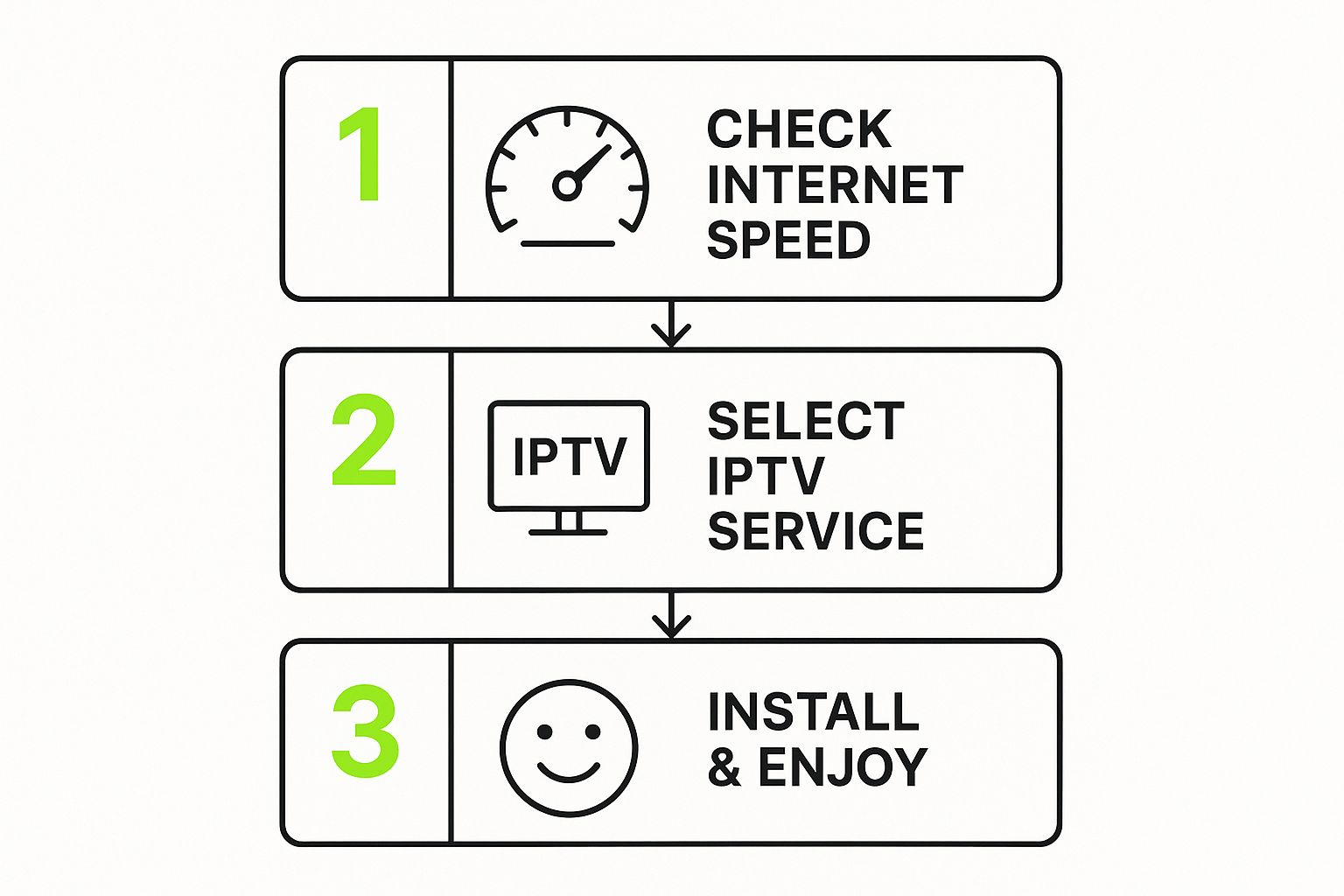
The image breaks down how to get IPTV into those three manageable actions, showing that the path from sign-up to streaming is just a simple, logical progression. Next, we'll dive deeper into each of these stops, making sure you have the confidence to build your perfect streaming setup without any headaches.
Let's be real—the single most important decision you'll make is picking your provider. A great service means a flawless, buffer-free stream. A bad one? Just endless frustration. This choice is the foundation for everything, from the channels you get to the picture quality on your screen.
The market is crowded and noisy, which can feel overwhelming. But if you focus on a few key things, you can cut through the chaos and find a service that actually delivers. Don't get distracted by a massive channel count; dig a little deeper to see what makes a provider worth your money.
A flashy website is one thing, but how the service performs on a Saturday night is what truly matters. Before you pull out your wallet, do a little detective work. Check out what real users are saying on independent spots like Reddit or specialized forums. That's where you'll find the unfiltered truth about reliability and customer service.
Here’s a quick checklist of the essentials:
For a closer look at our top picks, swing by our guide on the best IPTV service providers to see a detailed comparison.
Ultimately, you want a service that fits your viewing habits and your budget. For example, a sports fanatic will need a provider with rock-solid live event coverage and minimal delay. On the other hand, a movie lover might care more about the size and quality of the VOD library.
A provider's true value isn't just the number of channels they offer, but the stability of their streams during peak hours. A service that works perfectly on a Tuesday afternoon is useless if it buffers constantly during a major sporting event on a Saturday night.
If you're looking for a solid, all-around option with a strong reputation, we often point people toward IPTVNow.store. They offer a great starting point with a good mix of channels, a deep VOD library, and dependable stream quality.
By focusing on community feedback, stream quality, and core features like a good EPG, you can pick a provider that will give you a fantastic viewing experience for the long haul. Get this first step right, and the rest is easy.
Your IPTV provider sends you the content, but it's your streaming hardware that really brings it all to life. Getting the right device is a game-changer for a smooth, buffer-free picture. It's simple: you wouldn't drop a clunky old engine into a brand-new sports car, right? The same idea applies here.
The box or stick you plug into your TV has a huge impact on everything, from how fast channels load to the crispness of the video. While there are a ton of options out there, they are definitely not all the same. Some will choke on high-quality 4K streams, while others deliver a buttery-smooth experience every time.
A lot of new smart TVs have their own app stores, and it's tempting to just download an IPTV player and call it a day. It’s convenient, for sure, but this path often leads to headaches. Smart TV processors are usually pretty underpowered, and they don't get software updates nearly as often as dedicated streaming gadgets.
What does that mean for you? Sluggish menus, random app crashes, and annoying compatibility problems. A dedicated streaming device, however, is built to do one thing and do it well: stream video. They pack more powerful processors, more memory (RAM), and get regular updates for better performance and security. For a deep dive into how different devices stack up, check out our full streaming device comparison.
When you're ready for a dedicated device, a couple of players consistently rise to the top for IPTV performance. These gadgets have the muscle to handle HD and 4K streams without that dreaded buffering wheel.
Amazon Firestick 4K Max
The Firestick is a fan favorite among IPTV users, and for good reason. It hits that sweet spot between price and power. The 4K Max model is the one to get—it has Wi-Fi 6 for a rock-solid connection and a zippier processor that makes flipping through channels and menus feel incredibly responsive. You can grab the latest Amazon Firestick right from their store.
NVIDIA Shield TV Pro
If you want the absolute best, no-compromise experience, the NVIDIA Shield TV Pro is the king of the hill. Its AI upscaling is pure magic, making standard HD content look sharper on your 4K screen. Plus, its processor is a beast that chews through even the most demanding streams without breaking a sweat. It's a bigger investment, but for serious streamers who can't stand lag, it’s worth every penny.
Think of your streaming device as a long-term investment in your entertainment. Spending a little extra on a powerful device now will save you from years of frustrating buffering down the road.
What if you don't want to buy any new gear? You don't have to. Any decent laptop or desktop computer can instantly become a fantastic IPTV screen. This is exactly where a browser-based tool like our Free IPTV Player really shines.
There’s absolutely nothing to install. Just open your web browser, paste in your M3U playlist URL, and you're watching. This approach is perfect for trying out a new IPTV service, catching a game while you're on the move, or for anyone who just loves a simple, clean setup. It turns the computer you already own into a full-blown IPTV player.
Once you’ve signed up for an IPTV service, you'll get the master key to all your new content: the M3U playlist URL. This long, technical-looking link is easily the most important thing your provider will send you. Getting a handle on what it does is a huge part of learning how to get IPTV up and running.
Think of it as a private web address that points your player to the right server. When you plug this URL into an IPTV player, it tells the app exactly where to find and load all the channels, movies, and shows in your package. Without it, your player is just an empty shell.
You’ll usually find your M3U URL in the welcome email from your provider right after you subscribe. Sometimes, you can also find it in your account dashboard on their website. It’s super important to copy this link exactly as it appears—even one wrong character will make it stop working.
Once you have it, you need to treat it like a password.
Your M3U URL is tied directly to your subscription. If you share it around, someone else could use your service, which might get your account flagged or even shut down by your provider for breaking their rules.
Keeping your access secure is more critical than ever, especially with how fast the IPTV market is growing. The global market, which was valued at around USD 381.5 billion in 2025, is expected to explode to an incredible USD 1,803.1 billion by 2035. That’s a nearly 4.73-fold increase, showing just how much entertainment is shifting online.
Actually using your URL is the easy part. It’s pretty much just a copy-and-paste job. Once you’ve got the link copied, you just need a player that can load it up. For a super simple experience without installing any software, our Free IPTV Player is the perfect tool for the job.
Here’s all you have to do:
This browser-based player is perfect for quickly testing a new service or for watching on a laptop where you’d rather not install another app. You can find out more in our detailed guide on how to play M3U files.
If you ever run into a 'playlist failed to load' error, the very first thing to do is double-check that you copied the entire URL perfectly from your provider. That’s usually the culprit
So, you've got your IPTV service up and running. That's a great start, but let's be honest—the real win is getting that silky-smooth, buffer-free stream. Nothing kills the vibe on movie night faster than a picture that keeps freezing.
The good news? A few simple tweaks to your setup can take your stream from choppy to seamless. It's easier than you think.
Most of the time, performance issues come right back to your internet connection. While Wi-Fi is super convenient, a wired Ethernet connection is the undisputed champion for streaming. It gives you a stable, direct line to your router, cutting out the signal drops and interference that plague wireless setups. An affordable Ethernet cable from Amazon is a tiny investment for a huge leap in reliability.
Even with a top-notch provider, your home network is a massive piece of the puzzle. Making a few small adjustments here can pay off big time in stream quality. Before you do anything else, it's a good idea to run a quick speed test to see if your connection is actually ready for HD or 4K streams.
Want to go deeper on these fixes? Check out our complete guide on how to optimize your internet connection for streaming.
Sometimes, the problem isn't your speed, it's about access. If you're running into geo-restricted content, leveraging location-specific proxies can be a game-changer. It's a solid way to get around regional blocks that might be limiting your channel list.
The hunger for stable, reliable access is only getting bigger as the market explodes. The global IPTV market was valued at USD 56.61 billion in 2025 and is expected to rocket forward at an 18.69% compound annual growth rate. This boom, especially in the Asia-Pacific region which grabs over 35.8% of global revenue, just goes to show how much we're all shifting to internet-based TV and why a rock-solid connection is so important.
If you're curious, you can learn more about these market trends and the rapid growth of IPTV services on businessresearchinsights.com. Ultimately, these small, smart adjustments are what will help you get the absolute most out of your service.
Jumping into the world of internet TV is exciting, but it's totally normal to have a few questions before you commit. Think of it like test-driving a car—you want to kick the tires and make sure everything feels right. Getting these last few details sorted out will give you the confidence to build a streaming setup that’s perfect for you.
We've rounded up the questions we hear all the time from people just starting their IPTV journey. Let's clear up those final hurdles with some straight, simple answers.
This is a big one, and the answer all boils down to the source of the stream. If an IPTV service has properly licensed the content it broadcasts—much like the big streaming giants you already use—then it’s 100% legal.
The gray area appears with the countless providers who stream copyrighted material without permission. It’s on you to do a little homework on your provider. A legitimate service will be transparent and professional, while a shady one often feels vague or too good to be true. Always stick with providers that have a credible, established online presence to stay on the right side of the law.
Your internet speed directly impacts your picture quality. For a stable Standard Definition (SD) stream, you'll want at least 15 Mbps. It's a solid starting point that gets the job done without much fuss.
But if you’re looking for a crisper picture, you’ll need a bit more power.
Keep in mind, these numbers are just a baseline. If you've got multiple people in your house gaming, browsing, or streaming at the same time, you'll need more bandwidth to keep everyone happy. A powerful device like an NVIDIA Shield TV Pro can easily handle high-quality streams, but only if your internet connection can keep up.
Almost always, this comes down to your subscription plan. Most IPTV providers offer tiered packages, and the basic, cheapest option is typically limited to a single stream at a time. If you try to log in on a second device, it’ll likely boot the first one off.
So, if you want to watch the game in the living room while someone else catches up on a show using a tablet, you absolutely need a plan that supports multiple connections. These plans usually cost a little extra, but they provide the flexibility a busy household needs.
Your M3U URL is the unique key to your subscription. It tells your IPTV player where to find the provider's servers to load all your channels and movies. Never share it, as anyone with the link could potentially access your service.
Treating your M3U URL like a password is just smart practice. It keeps your service secure and ensures you always have access to the content you paid for.
Ready to start watching without any hassle? The Free IPTV Player lets you stream directly in your browser with no downloads required. Just paste your M3U link and press play. Get started with the Free IPTV Player today!
