When your internet feels sluggish, the best first step is always the simplest one: reboot your router and modem. It's a foundational fix that solves a surprising number of slowdowns without needing any technical know-how. This, along with checking your internet plan's actual speed, sets the stage for a better connection.
For streaming, especially something like IPTV, a stable connection often matters more than just raw speed.
There's nothing worse than buffering right at a movie's climax. When you need a solution that works right now, start with your hardware.
Power cycling your gear is the oldest trick in the book for a reason. Simply turn your modem and router off, wait about 30 seconds, and then turn them back on. This simple act clears their temporary memory and forces them to establish a fresh, clean connection with your Internet Service Provider (ISP). You'd be amazed how often this solves mysterious slowdowns.
Next, it’s time for a reality check on your internet plan. That "up to 300 Mbps" speed your provider advertises is a best-case scenario, not a guarantee. Think of it like a highway's speed limit—your actual speed depends on traffic (network congestion).
To really get a handle on your connection, you need to understand two key ideas: bandwidth and latency. They’re not the same thing, and both are critical.
Bandwidth: This is the size of your internet pipe, measured in Mbps (megabits per second). Think of it as the number of lanes on a highway. More lanes (higher bandwidth) allow more data—like a 4K movie stream—to pass through at once without a traffic jam.
Latency (or Ping): This is all about response time. It measures the delay it takes for data to travel from your device to a server and back. High latency is what causes that annoying lag in online games or during live sports streams. A low-latency connection feels snappy and instant.
For IPTV streaming, high latency can be a showstopper, causing frustrating delays when you change channels or buffering during a live game, even if your bandwidth is technically high enough. You really need a good balance of both to get a great experience.
A stable connection with moderate bandwidth will almost always outperform an unstable connection with sky-high bandwidth when you're streaming live content. Consistency is what keeps the dreaded buffering wheel away.
Sometimes the problem isn't your internet at all, but a wonky connection on a single device. If you ever find yourself connected to Wi-Fi but still have no internet, you can learn how to troubleshoot common Wi-Fi connection problems to isolate the issue.
Finally, take a quick inventory of everything connected to your network. Every phone, smart TV, tablet, and laptop is competing for a slice of that bandwidth pie. If your whole family is streaming, gaming, and video conferencing at the same time, even a fast connection will feel the strain.
Getting these fundamentals right is the first step toward building a reliable home network. Before jumping to more complex solutions, it helps to know which fixes are for immediate relief and which are for long-term stability.
Here’s a quick breakdown of some common optimization tactics to help you decide where to focus your efforts.
| Optimization Tactic | Impact Level | Best For |
|---|---|---|
| Rebooting Router/Modem | High (Immediate) | Resolving temporary glitches and slowdowns. |
| Limiting Connected Devices | Medium (Immediate) | Reducing network congestion during peak use. |
| Using a Wired Connection | High (Long-Term) | Getting maximum speed and stability for key devices. |
| Upgrading Your Router | High (Long-Term) | Improving Wi-Fi range, speed, and device capacity. |
| Changing Your Internet Plan | High (Long-Term) | Increasing overall bandwidth for the entire home. |
These initial checks lay the groundwork for a solid network, getting you ready for more advanced tweaks down the road if needed.
Even the world's fastest internet plan can feel like a dial-up connection if your hardware is stuck in the past. Your router and modem are the gatekeepers for every bit of data coming into your home. If they're outdated, they're throttling your entire network.
A common offender is that all-in-one modem/router box your internet provider gave you. They're convenient, sure, but they almost always cut corners on performance. By splitting these into a dedicated modem and a separate, powerful router, you gain more control, better features, and usually, a major speed boost.
For a difference you can actually feel, especially with a family full of devices, grabbing a Wi-Fi 6 (802.11ax) router is a game-changer. It’s not just about raw speed; Wi-Fi 6 is built to juggle dozens of connected gadgets at once without dropping the ball. That means your 4K IPTV stream won't start buffering the second someone else hops on a video call.
You might be surprised how much your router's location matters. This isn't just about hiding an ugly box; it's about physics. Think of your router as the sun in your home's little solar system—it works best when it's right in the middle, able to reach every corner.
Try to follow a few simple placement rules:
If you have a larger home or those annoying "dead zones" where the Wi-Fi signal just gives up, a Mesh Wi-Fi system is your new best friend. Instead of one router trying to do all the work, a mesh system uses a team of nodes placed around the house to create one big, seamless network. For more comprehensive solutions, you can look into expert home networking installation services that can map out and install an ideal setup.
Upgrading your hardware is an investment in your daily online experience. A modern router can reduce latency, eliminate dead zones, and ensure every device on your network performs at its best.
This is more important than ever as internet speeds keep climbing. The global average for fixed broadband has already shot up to around 113 Mbps. To actually use those kinds of speeds for smooth 4K streaming and gaming, your home gear has to be able to keep up.
Finally, don't forget the humble cable. For anything that stays put—like your smart TV or streaming box—a wired Ethernet connection will always beat Wi-Fi. It’s a direct, stable link to your router that eliminates signal drops and delivers the fastest speeds possible for a perfect IPTV stream. Just make sure you're using a Cat6 cable or better to get the job done right.
Once you've got your hardware sorted, you'll be ready to dive into high-quality streaming. Our guide on how you can get IPTV can show you what to do next.
Before you even think about optimizing your Wi-Fi signal or upgrading your router, you need to look at the very foundation of your internet experience: the type of connection coming into your home. Not all internet is built the same, and the technology delivering those sweet, sweet streams of data directly impacts whether you get a smooth movie night or a buffering nightmare.
If you’re constantly battling lag and poor quality despite having a decent setup, your connection type itself might be the real culprit. Let's break down the main players: Fiber, Cable, DSL, and Satellite. Each one has its own personality, with different strengths and weaknesses.
Think of these connections like different kinds of roads. Some are wide-open superhighways, while others are bumpy backroads that slow you down.
Fiber-Optic: This is the undisputed king of the internet world. It uses lasers to shoot data through thin glass strands at the speed of light. The result? Insanely fast speeds, both for downloading and uploading (what we call symmetrical speeds), and almost zero lag. If you’re into 4K streaming, online gaming, or have a house full of people all online at once, fiber is the dream.
Cable: This is a very common and pretty solid option. It piggybacks on the same coaxial cables that deliver your TV service. You’ll get fast download speeds, which is great for streaming, but the upload speeds are usually much, much slower. It’s also a shared connection in your neighborhood, so you might notice things slow down when everyone gets home from work and starts binge-watching.
DSL (Digital Subscriber Line): This one uses your old-school telephone lines. Its biggest issue is distance—the farther you live from your provider's main hub, the slower and less reliable your connection gets. It’s often a cheaper choice, but it can really struggle to keep up with anything more demanding than basic HD streaming.
Satellite: For many folks in rural areas, this is the only game in town. The signal gets beamed down from space, which sounds cool, but that massive distance creates a ton of delay (or latency). This makes it a really poor choice for anything fast-paced like live IPTV or online gaming.
The image below gives you a few pointers on how to optimize your physical setup at home. These tips become even more important when you're trying to get every last drop of performance from a slower connection type like DSL or Cable.
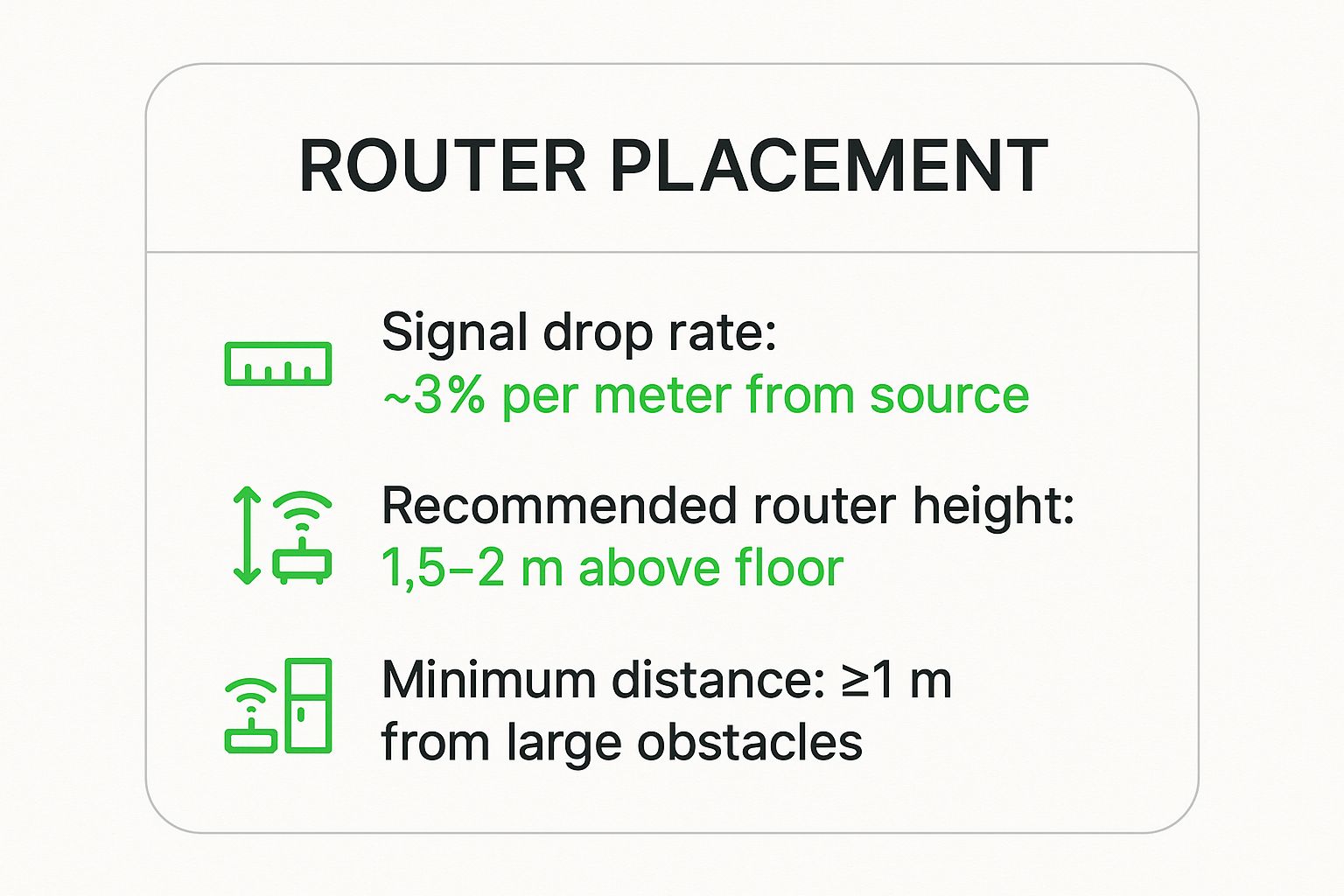
As you can see, simple tweaks like elevating your router off the floor and keeping it away from other electronics can make a real difference in your signal strength.
At the end of the day, a solid fixed broadband connection is what makes high-speed internet possible. When you look at global leaders, you see what top-tier infrastructure can do. Take Singapore, for example. As of May 2025, it boasts a median fixed broadband speed of 372.02 Mbps, largely thanks to its massive fiber network. That’s the kind of speed that lets you stream multiple 4K videos without breaking a sweat.
For a service like IPTV, which is all about delivering live, high-def video, a fast and stable connection isn't just a nice-to-have—it's essential. To really get your money's worth from a great provider like IPTV Now, investing in the best internet available in your area is the single biggest upgrade you can make.
Of course, you also need to make sure the plan you choose matches what you actually do online. Our guide on what internet speed for streaming you need can help you figure out the perfect speed for your home.

Even with the best hardware and a lightning-fast internet plan, the software chugging away on your devices can secretly sabotage your connection. Think of your bandwidth as a highway; every app running in the background is another car, creating a traffic jam that slows everything else down.
Thankfully, a few simple software-side tweaks can deliver a surprising performance boost.
Your first move is to hunt down and shut down these bandwidth hogs. On a PC, a quick tap of Ctrl+Shift+Esc brings up the Task Manager, where you can see exactly what’s eating up your network resources. For your smart TV or Android TV streaming box, make it a habit to close any apps you aren’t actively using.
You'd be surprised how many services—from cloud backups to automatic software updates—run silently in the background, consuming precious bandwidth that your IPTV stream desperately needs to run smoothly.
Just like your car needs a regular oil change to run well, your devices need their software kept up-to-date for peak performance. This is a small but critical step that many people overlook when they're trying to figure out why their internet is acting up.
These updates ensure your hardware and software are communicating as efficiently as possible, which is absolutely vital for a stable connection. Managing your streaming sources is also key; learning how to create an M3U playlist can give you much better control over your content and performance.
Look, Wi-Fi is incredibly convenient, but it's also notoriously fickle. It's easily disrupted by interference from other devices, distance from the router, and even physical obstacles like thick walls.
For any stationary device you rely on for high-quality streaming—like your smart TV, streaming box, or game console—there is simply no substitute for a wired Ethernet connection.
Plugging in an Ethernet cable is the single most effective thing you can do to guarantee you're getting the full, stable speed you pay for. It bypasses all the variables of Wi-Fi, giving you a direct, rock-solid link to your router.
This one simple change often completely eliminates buffering caused by a weak wireless signal. It also drastically reduces latency, which is a game-changer for live IPTV broadcasts.
For the most reliable setup, invest in a quality Cat6 or Cat7 Ethernet cable. They’re designed for high-speed networks and offer better shielding against interference, ensuring your connection is as clean and fast as possible. It’s a cheap upgrade that delivers an immediate and noticeable improvement.
Your home Wi-Fi is your comfort zone, but what happens when you step outside? Optimizing your internet connection isn't just for the living room anymore. Your mobile data connection is often more than powerful enough to deliver a perfect IPTV experience, whether you're on a train, traveling, or just enjoying some fresh air.
The real game-changer here has been the rollout of 5G technology. This isn't just some small step up from 4G; it's a giant leap that has completely transformed mobile streaming. 5G brings much higher speeds and way lower latency, which means your live streams fire up faster and buffer less, even when you're in a crowded place.
This massive improvement isn't just hype; the global speed tests back it up. In fact, over the last couple of years, the worldwide median cellular download speed has shot up by over 80%, a jump driven almost entirely by the spread of 5G.
Some countries are absolutely crushing it. The United Arab Emirates, for example, clocked a mind-blowing median mobile download speed of 441.89 Mbps in early 2025. You can dig into the specifics and read the full report on accelerated internet access to see just how much these networks are improving.
Tapping into this power is all about forming a few smart habits. The first one is knowing when to ditch Wi-Fi for your cellular data. Think about it: if you're in a coffee shop or hotel with a sluggish, congested network, your phone's 5G or even a solid 4G LTE connection will almost always give you a better, more stable stream.
Don't hesitate to toggle off your Wi-Fi and see what your mobile data can do. For a solid IPTV experience with a service like the one from IPTV Now, a stable connection is everything.
Another fantastic tool in your arsenal is your phone's mobile hotspot. This feature instantly turns your smartphone into a portable Wi-Fi router. You can connect your laptop, tablet, or even a smart TV to its cellular data, which is perfect for watching on a bigger screen when you're away from home.
A strong 5G connection can often blow public Wi-Fi out of the water, giving you a private, secure, and faster link for uninterrupted streaming. It’s your personal, pocket-sized router for enjoying IPTV anywhere.
To squeeze the best performance out of your mobile hotspot, keep these simple tips in mind:
By mastering these simple mobile strategies, you're free to stream your favorite shows and channels reliably, no matter where life takes you.
Even after tweaking all the settings, a few nagging questions always seem to pop up. Getting your setup just right often means digging into the "why" behind those common streaming headaches. Here are some straight answers to the questions we hear most often from folks trying to get that perfect, buffer-free stream.
That speed your Internet Service Provider (ISP) advertises? Think of it as a car's top speed, not what you'll actually hit during rush hour. The number on your bill is a theoretical maximum, and a bunch of real-world factors can slow you down.
For starters, your entire neighborhood might be creating network congestion. This happens most often in the evenings when everyone jumps online to stream, game, or just scroll. On top of that, an old router, a weak Wi-Fi signal struggling to get through walls, or just too many phones and laptops connected at once can slash the speeds you actually experience.
Yes, a Virtual Private Network (VPN) will almost always shave a bit off your raw internet speed. It’s a simple matter of physics—your data has to make an extra stop at the VPN server before reaching its destination, which adds a tiny bit of delay.
But here's the twist: a good VPN can sometimes improve your stream. Some ISPs practice throttling, where they deliberately slow down video traffic to manage their network. A VPN encrypts your connection, making it impossible for your ISP to see what you're doing, effectively letting you bypass that artificial speed limit. To get a better handle on how this all works, check out our guide on what is live TV streaming.
If you're using a VPN for IPTV, it's a non-negotiable to pick a premium service with high-speed servers. Always try to connect to a server that's geographically close to you—this keeps the speed loss to a minimum and gives you a much more stable connection.
Oh, absolutely. For any device that stays put—like your Smart TV, PlayStation, or a dedicated streaming box—a wired Ethernet connection is the undisputed king of performance. It’s a direct, stable pipeline to your router that isn't bothered by interference from your microwave or thick concrete walls.
Honestly, plugging in an Ethernet cable is the single most effective trick in the book for killing buffering caused by a shaky Wi-Fi signal. It guarantees your device gets every last drop of speed your internet plan can offer, making it the gold standard for high-quality, uninterrupted streaming.
At Free IPTV Player, our mission is to give you a smooth, buffer-free viewing experience. By getting a handle on these common speed bumps, you can get the absolute most out of our browser-based player. For the ultimate in streaming stability, consider a premium service like IPTV Now.
