If you're fed up with your cable bill ballooning year after year, you're in good company. The mass exodus from traditional cable isn't just a passing trend; it's a genuine shift in how we watch TV. People are demanding more choice, better flexibility, and, most importantly, control over their spending.
The era of being shackled to a two-year contract loaded with channels you never even click on is quickly coming to an end.
The numbers don't lie. Cord-cutting is exploding, with millions of households making the switch. In 2023 alone, a staggering 95.1 million people in the U.S. had already ditched their cable boxes—that's nearly 36% of the population. Projections from sources like Techjury.net suggest that figure will soar past 112 million by 2026 as more viewers discover smarter, more affordable alternatives.
So, how are all these people doing it? There are three main paths to cable freedom, each catering to different viewing habits and budgets. Let's break them down. For a more detailed walkthrough, you can also check out our complete guide on how to cut cable TV.
When you decide to cut the cord, you aren't sacrificing content—you're just getting it in a smarter way. Here are the three most popular methods people are using today.
Live TV Streaming Services: Think of these as the modern-day cable package. Platforms like Sling TV or YouTube TV deliver live channels directly over your internet connection, giving you that familiar channel-surfing experience.
Over-the-Air (OTA) Antennas: This is the original cord-cutting method, now supercharged for the digital age. A modern antenna can pull in crystal-clear, high-definition broadcasts from major local networks like ABC, CBS, NBC, and FOX completely free of charge.
IPTV (Internet Protocol Television): A seriously flexible and powerful option. IPTV uses your internet connection to stream TV content, often through simple M3U playlists. This opens up a massive world of both live and on-demand content from all over the globe, often through services like IPTVNow.
The easiest way to dive into IPTV is with a browser-based tool like our Free IPTV Player. You can instantly start watching on any device—no downloads, no installations. It’s a seamless gateway to a universe of entertainment.
Each of these methods offers a solid alternative to traditional cable. The real magic happens when you realize you can mix and match them to create a personalized setup that gives you exactly what you want, without paying for what you don't.
To help you decide which route is best for you, here’s a quick comparison of the top cable-free methods.
| Method | What You Get | Best For | Typical Cost |
|---|---|---|---|
| Live TV Streaming | A bundle of live cable channels (ESPN, CNN, HGTV, etc.) and often on-demand content. | Viewers who want a familiar cable-like experience with live sports and news. | $40 - $80+ / month |
| OTA Antenna | Free local channels like ABC, NBC, CBS, FOX, and PBS in HD. | Anyone who mainly watches major network shows, local news, and live sports. | $20 - $60 (one-time) |
| IPTV | Access to thousands of global live channels, movies, and TV series via M3U playlists from a service like IPTVNow. | Tech-savvy users looking for maximum variety, international content, and customization. | Varies (Free to $20+ / month) |
Ultimately, whether you choose a streaming service for live sports, an antenna for local news, or IPTV for endless variety, you're taking back control. You can finally build an entertainment system that fits your lifestyle and your budget.
If you're hesitant to cut the cord because you can't imagine missing live sports, breaking news, or just the simple act of channel surfing, I get it. The good news is, you don't have to give any of that up. Live TV streaming services are designed for people just like you.
These platforms perfectly replicate that classic cable experience—right down to the channel guide—but deliver it all over your internet connection. They’ve quickly become the go-to answer for how to watch TV without cable.
The best part? No more contracts. Unlike the iron-clad agreements from cable companies, these services are all month-to-month. You could literally sign up for YouTube TV just for football season and cancel it the day after the Super Bowl, no questions asked. We've got a whole guide that breaks down what is live TV streaming if you want to get into the nitty-gritty details. This freedom is exactly why so many people are making the switch.
A handful of major services have stepped up to offer channel packages that can go toe-to-toe with anything from a traditional cable provider. Here are the ones I usually recommend people check out first:
This isn't just a niche trend; it's a massive shift in how we watch TV. Projections show that by 2026, a staggering 80.7 million U.S. households will have cut the cord completely. The reason is simple: money. Around 86.7% of cord-cutters point directly to the high cost of cable as their main motivation.
Getting set up is surprisingly simple. All you really need is a decent internet connection and a compatible streaming device to plug into your TV. Think of the device as the little hub for all your streaming apps.
My Two Cents: Don't skimp on your internet. A stable connection is the foundation of a good streaming experience. For smooth HD quality, you'll want at least 25 Mbps. If you have a family of streamers, you should probably aim even higher.
The most popular streaming devices are simple sticks or small boxes you just plug in and set up. To make your transition seamless, I’d grab one of these:
While these services do have a monthly fee, the freedom from contracts and surprise charges makes them an excellent first step away from cable.
Before diving into the world of monthly streaming bills, it's worth looking at an old-school solution that's gotten a serious upgrade. A lot of people are surprised to learn that major networks like ABC, CBS, NBC, and FOX still broadcast their signals over the air for free. They've been doing it for decades, but there's a huge difference now: the signal is pure, uncompressed high-definition.
Honestly, the picture quality from an antenna often looks even better than what you get from a compressed cable or satellite feed.
This is probably the most direct answer to the question of how to watch TV without cable. A modern over-the-air (OTA) antenna gives you legal, free access to dozens of local channels. This isn't just public access; we're talking local news, popular sitcoms, PBS, and even huge sporting events like the Super Bowl. It’s a one-time purchase that delivers a lifetime of free TV, making it a cornerstone for any serious cord-cutter.
The perfect antenna really comes down to one thing: your location and how far you are from the local broadcast towers. Forget the giant metal monstrosities of the past—today's antennas are sleek and often barely noticeable.
Indoor Antennas: If you live in a city or a dense suburb, you're in luck. An indoor model is likely all you need. Options like the Gesobyte Amplified HD Digital TV Antenna are paper-thin, stick to a window or wall, and can pull in signals from over 200 miles away under the right conditions. They’re super easy to set up, making them great for apartments or anyone who doesn’t want to climb on the roof.
Outdoor Antennas: For those in more rural spots or areas with lots of hills and trees, an outdoor antenna is the way to go. A model like the GE Outdoor TV Antenna has the power to grab weaker signals from much farther away and is built tough enough to handle whatever the weather throws at it.
Pro Tip: Don't just guess which antenna to buy. Use the FCC's DTV Reception Maps first. Just pop in your address, and it shows you exactly which channels you should get and which direction to point your antenna. It removes all the guesswork and saves you a ton of frustration.
Once you've got your antenna, it's all about placement. For an indoor model, start by placing it as high as you can and near a window. Signals can be blocked by thick walls, metal siding, or even big hills between you and the tower, so you might have to try a few spots to see what works best.
Connect the antenna to your TV’s coaxial input (the little screw-on connector) and then dive into your TV’s settings menu. Find the "channel scan" or "auto-tune" function and run it. Your TV will then search for all the available signals and save them to your channel list.
If you’re in a fringe reception area and the picture is breaking up, an amplifier like the Channel Master TV Antenna Booster can be a game-changer. It cleans up the signal before it reaches your TV, often resulting in a clearer picture and even a few extra channels you couldn't get before.
So far, we’ve covered options that mimic traditional cable packages and antennas that pull in local channels for free. But there's another route you can take, and it’s a game-changer if you’re looking for a truly global viewing experience: IPTV (Internet Protocol Television).
Simply put, IPTV uses your internet connection to stream thousands of live TV channels from all over the world. We're talking about a massive universe of content far beyond what any standard cable package could offer. Think international sports, foreign-language news, and niche channels you’d never find otherwise. It’s the ultimate setup for anyone who wants total control and variety.
The magic behind IPTV is an M3U playlist. It sounds technical, but it’s just a simple text file or URL that points to all the live TV streams. You pop this into a compatible player, and suddenly you have a full channel guide at your fingertips. If you want to get into the nitty-gritty, we break it all down here: what IPTV is and how it works.
First things first: you need an M3U playlist. The quality of your source is everything—it's the difference between a smooth, buffer-free experience and a frustrating mess of dead links.
I always recommend going with a reputable subscription service like IPTVNow. A professional provider ensures you get stable streams, great video quality, and a channel guide that actually works. It just saves you so many headaches in the long run.
A good provider will give you a clean, simple dashboard like this one. It makes finding your playlist URL and managing your subscription incredibly straightforward, which is exactly what you want.
Once you've got your M3U playlist URL, you need a player. A lot of apps out there make you jump through hoops with downloads and complicated setups. We built our Free IPTV Player to skip all that nonsense.
The biggest advantage? It's 100% browser-based. That means absolutely no downloads and no installation. You can start watching instantly on any device with a web browser—your laptop, tablet, phone, or even your smart TV.
This approach just makes life easier:
This desire for simplicity is a huge reason why younger viewers are ditching cable. In 2022, 45% of American cord-cutters were between 18 and 34. As this tech-savvy generation becomes the norm, you can bet that easy, app-free solutions will become the standard. You can see more cord-cutting trends and statistics here.
While our player works great on any browser, for the best TV experience, you'll want a dedicated streaming device. Something like an Android TV box is the perfect companion for IPTV because it runs a powerful OS and has a full web browser.
It gives you that classic "lean-back" experience with a proper remote, all optimized for the big screen. You just open the browser on the device, pull up our player, and you're set.
To help you get the right gear, I’ve put together a quick comparison of my favorite devices for a solid IPTV setup.
Here's a quick look at some of the best devices on the market that will give you a fantastic experience with streaming apps and our browser-based IPTV player.
| Device | Best Use Case | Key Feature | Link |
|---|---|---|---|
| Amazon Fire TV Cube | All-in-one entertainment hub | Fast processor and hands-free Alexa voice control. | Check Price on Amazon |
| NVIDIA SHIELD TV Pro | High-performance streaming and gaming | AI-powered 4K upscaling for superior picture quality. | Check Price on Amazon |
| Android TV Box | Budget-friendly and versatile | Access to the Google Play Store and full browser support. | Check Price on Amazon |
By pairing one of these devices with our Free IPTV Player and a solid M3U playlist from a service like IPTVNow, you create an incredibly powerful and flexible setup. It’s a fantastic way to get global content without the technical headaches, and truly one of the best ways to cut the cord for good.
Alright, now that we've covered the different ways to ditch cable, let's get to the fun part: building a setup that's actually right for you. There's no one-size-fits-all answer here. The best system is a mix-and-match of a few key components tailored to your viewing habits and, of course, your budget.
When you're piecing it all together, don't forget about how it all looks and fits in your room. You might find some inspiration from these clever TV unit design ideas to make your new setup look clean and intentional.
The most important question to ask yourself is: what do I actually watch? Someone who lives and breathes sports is going to need a very different setup than someone who’s happy with local news and old movies.
Let's walk through a couple of practical examples to give you some solid ideas.
Before we dive in, a quick word on internet speed. A lot of people worry they need a super-fast connection, but that's not always the case.
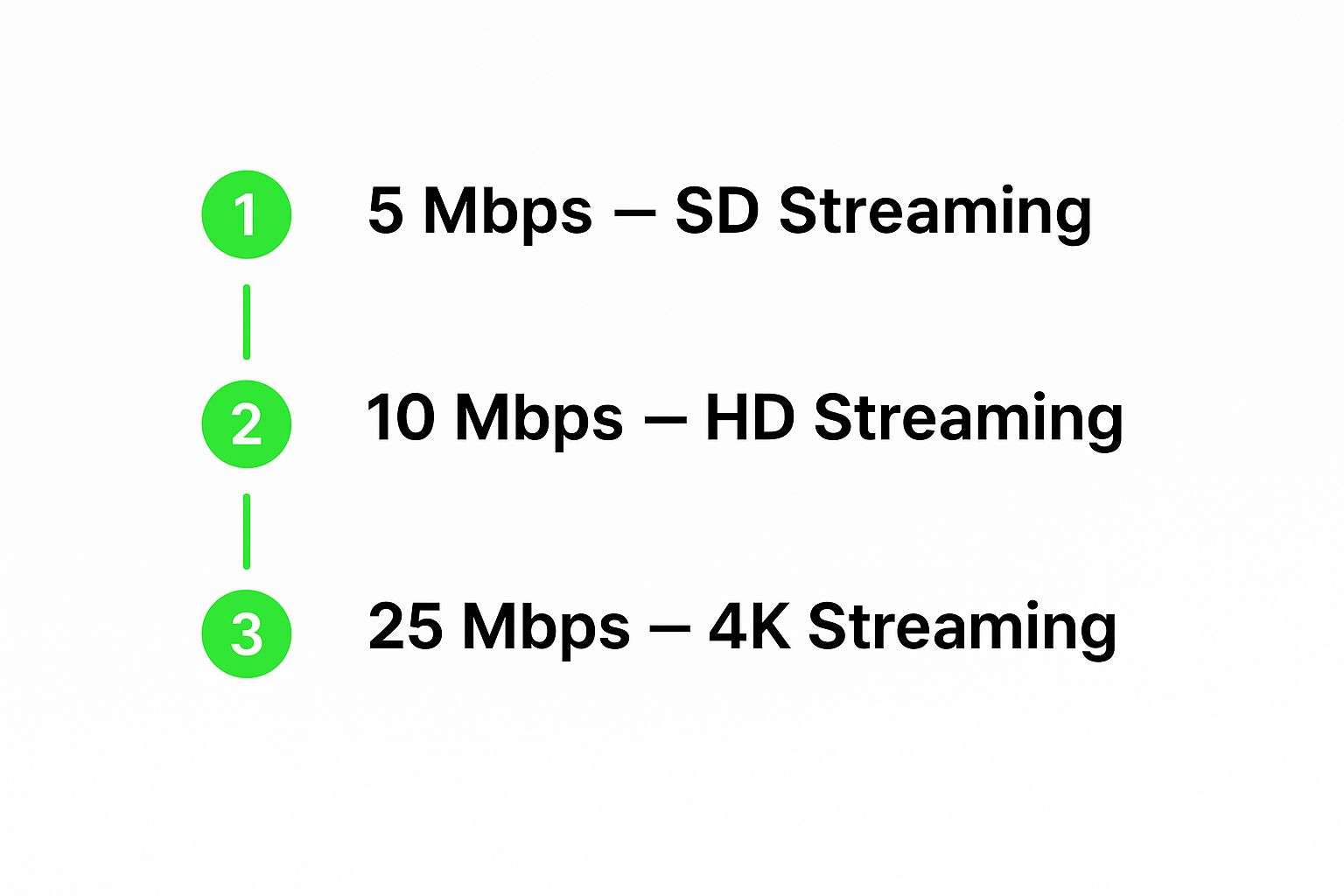
As you can see, you don't need to break the bank for gigabit internet. Even a pretty standard 25 Mbps connection will handle 4K streaming just fine.
This one’s for the smart cord-cutter who wants the most bang for their buck—ideally, with almost no monthly fees. It's perfect for catching all the major network shows, your local news, and then tapping into a massive library of global content for free.
If missing a game is simply not an option, you'll want a more robust, hybrid setup. This approach gives you rock-solid access to everything, from games blacked out in your local area to international tournaments you can't find anywhere else.
By playing with these different building blocks, you can create a personalized entertainment system that gives you exactly what you want to watch, without paying a dime for all those filler channels you always skip.
Making the jump from cable can feel like a big step, and it's natural to have a few questions. Let's walk through some of the most common things people ask when they're getting ready to go cable-free.
This is probably the most critical piece of the puzzle. Your internet connection is the new pipeline for all your entertainment.
For most households, a steady 25 Mbps connection is enough to stream in HD on a couple of devices without any major hiccups. But if you've got a family of streamers, gamers, or you're planning on enjoying that new 4K TV, you'll want to aim higher—think 50-100 Mbps or more. That's the sweet spot to keep buffering at bay.
The one setup that doesn't care about your internet speed at all? A good old OTA antenna. Since it pulls signals right out of the air, it works completely offline, making it the perfect backup plan.
Nope, you can definitely still catch the local news and the big game. In fact, you might even get a better picture than you did with cable.
Your best bet for free local channels like ABC, NBC, CBS, and FOX is a modern OTA antenna. Because the signal isn't heavily compressed like it is for cable, the picture quality is often surprisingly crisp and clear.
Of course, nearly all major live TV streaming services also carry local channels. Just make sure you pop your zip code into their website to see exactly which ones you'll get before you subscribe.
Key Takeaway: Using an IPTV player, like our free browser-based tool, is completely legal. A player is just software that reads a video stream. The important part is ensuring the stream itself—your M3U playlist—comes from a legitimate source.
This question comes up a lot, and the answer is simple: the player itself is 100% legal and safe. Think of an IPTV player like a web browser or a media player on your computer. The tool itself is perfectly fine; what matters is the content you access with it.
The legality all boils down to where you get your M3U playlist. To stay on the right side of things, it's essential to use a verified, legitimate subscription service. That’s why we point people toward our trusted partner, IPTVNow, which ensures all the content is properly licensed.
Our browser-based player also gives you an added layer of security. Since you don't have to download or install any software, there's zero risk of accidentally installing malware.
You really don't need much to get up and running. At its core, all you need is a TV, a decent internet connection, and a streaming device. An Amazon Fire Stick or an Android TV box are fantastic, budget-friendly options that handle the job beautifully.
Let's break it down by setup:
Ready to take control of your TV viewing experience? With the Free IPTV Player, you can instantly access live channels from around the world on any device with a browser—no downloads, no installation, and no hassle.
