An IPTV M3U player is essentially a piece of software or a web tool that can read and play M3U playlist files. It’s what lets you stream live TV channels and on-demand content right over the internet. These players give you the freedom to watch shows and movies from all sorts of sources just by loading a simple playlist URL or file.
Before you jump into streaming, let's quickly break down what an IPTV M3U player is actually doing behind the scenes. The best way to think about an M3U file is as a basic playlist. It’s just a simple text file that holds a list of links, telling your player exactly where to find live TV channels, movies, and TV series online.
The player itself is the app or website that reads that list and brings the video content right to your screen. This combination is incredibly popular because it puts you in complete control, allowing you to use playlists from many different IPTV sources. You're never locked into a single provider's app.
If you want to get into the nitty-gritty of the tech, check out our guide on what IPTV is and how it works.
People love this setup for a few key reasons, especially if they want a more custom streaming experience:
The whole IPTV M3U player ecosystem has become a go-to for anyone who wants to manage their own personalized channel lists. Apps built to handle M3U playlists have blown up in places like Europe and North America because they make it so easy to organize massive channel lineups and on-demand libraries. You can find more insights about these streaming trends right here.
Before we go further, it helps to know some of the lingo.
Get familiar with the basic terminology to understand how everything works together.
| Term | What It Really Means | Why It Matters for You |
|---|---|---|
| IPTV | Internet Protocol Television | This is the technology that sends TV content over the internet instead of through traditional cables or satellites. |
| M3U Playlist | A simple text file with links | This is your channel list. The player reads this file to find and play your streams. |
| EPG | Electronic Program Guide | This is your interactive TV guide. It shows what's on now and what's coming up next for each channel. |
| VOD | Video-On-Demand | This refers to movies and TV shows you can watch whenever you want, like a personal Netflix library. |
Knowing these terms makes it much easier to navigate the world of IPTV and get your setup just right.
For the best big-screen experience, we always recommend a dedicated streaming device. It will handle high-definition video streams much better than a standard smart TV app, which means way less buffering.
To get that silky-smooth playback, especially in 4K, you need to pair your player with solid hardware. A device like the Amazon Fire TV Stick 4K Max is an awesome—and surprisingly affordable—choice that can make a huge difference in your viewing experience.
The quality of your streaming experience hinges almost entirely on the M3U playlist you use. Think of this playlist as the digital key to your content, and honestly, getting a good one is the most critical part of the whole setup.
Your playlist will usually come from a dedicated IPTV provider, and you'll typically get it in one of two ways. You might receive a downloadable M3U file, which is just a static list of channels. The better option, in my experience, is an M3U URL. This is a dynamic link, meaning your provider can push updates automatically—adding new channels, fixing issues, or refreshing the program guide (EPG) without you having to lift a finger.
It’s so important to pick a reputable and legal IPTV service if you want to avoid some major headaches. I've seen it time and time again: free or sketchy playlists are riddled with dead links, constant buffering, and can even pose security risks. A quality, legitimate provider is the foundation for a stable, high-definition stream.
For instance, our trusted partner, IPTVNow, offers reliable subscription packages that deliver consistent performance.
Services like this are focused on providing stable connections and a huge variety of channels, which is exactly what you need to get the most out of your player.
The core difference between a frustrating IPTV setup and a great one is almost always the source of the M3U playlist. Investing in a quality service saves you countless headaches down the road.
While most providers will give you a ready-made list, you can also get your hands dirty. If you're interested in building a totally custom channel lineup from scratch, you might want to check out our detailed guide on how to create your own M3U playlist. This puts you in the driver's seat.
Ultimately, whether you subscribe to a service or build your own list, reliability is the name of the game.
Alright, let's get down to the fun part—actually playing your channels with our free online IPTV player. I'm going to walk you through how to get everything up and running.
The best part? You don't need to install a single thing. Forget complicated setups. Everything happens right here on our website, turning your browser into a streaming powerhouse in just a couple of minutes.
Head over to the player interface on our site. You’ll see an input field right away. That's where all the magic is going to happen.
You've got your playlist from your provider, right? Great. Now you have two easy ways to load it up, depending on the format they gave you.
Once you’ve added your playlist, the player will get to work processing it. This usually only takes a few seconds, and then your channel list will pop right up.
Speaking of a great experience, if you're looking to bring this to your main TV, pairing our player with a solid streaming device is the way to go. I'm a big fan of the Amazon Fire TV Stick 4K; it has more than enough power to handle smooth, high-definition playback.
This graphic gives you a quick look at the key features you'll be using in our player.
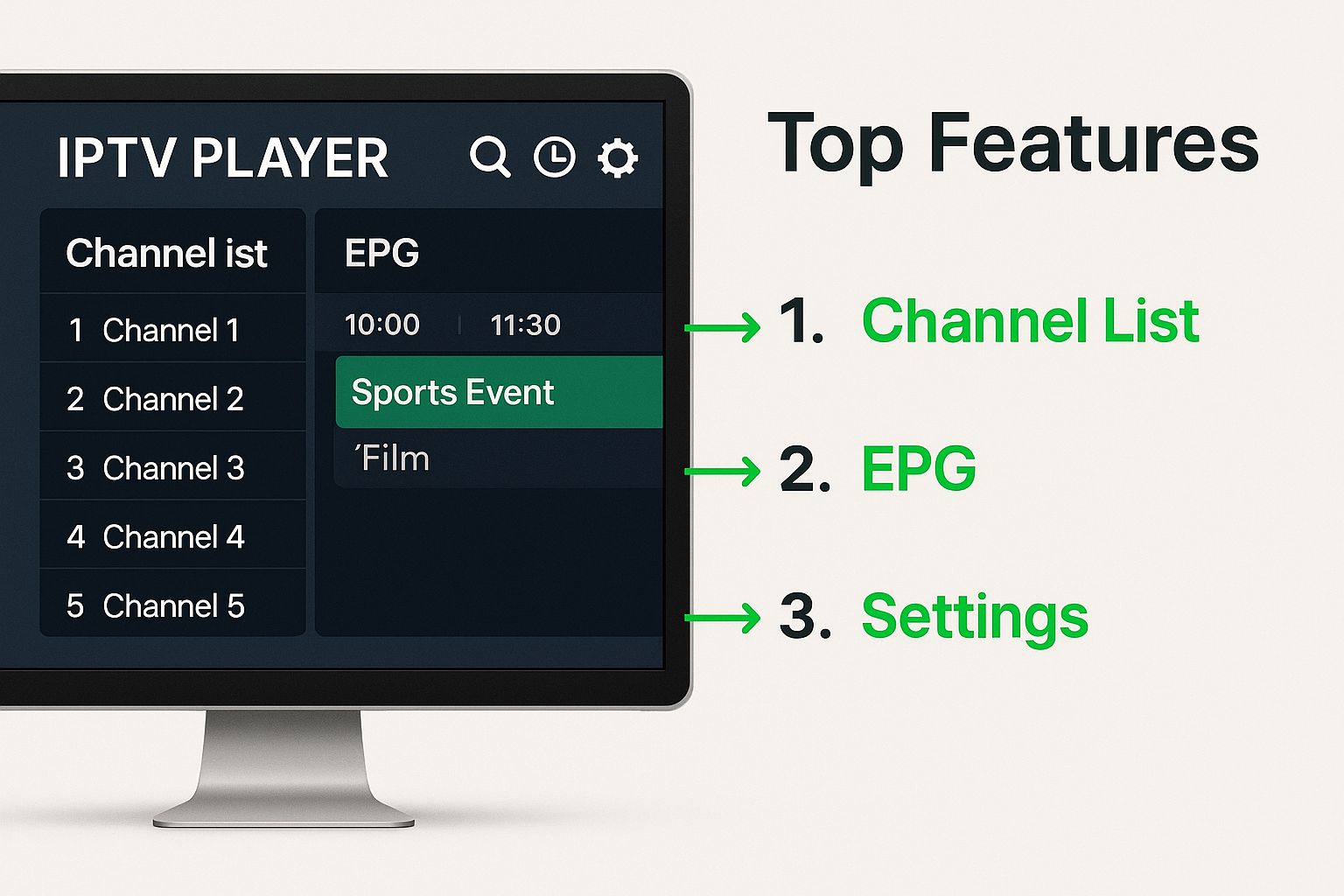
As you can see, a well-designed IPTV M3U player should feel intuitive. It's all about making it simple to find your channels, check the program guide, and tweak settings on the fly.
Okay, your playlist is loaded. You're probably looking at a huge list of channels and VOD content now. Scrolling through hundreds—or even thousands—of options is nobody's idea of fun. This is where the search function becomes your best friend.
A great player experience isn't just about loading a playlist; it's about making it effortless to find exactly what you want to watch. That’s why a clean interface and a fast search tool are so important.
Just start typing the name of the channel, movie, or series you're looking for into the search bar. The list filters in real-time, instantly shrinking the options to what you want.
Found it? Just click on it. The stream will start playing in the main window immediately. It really is that simple. No confusing menus, no extra steps. You're now officially streaming IPTV.
Just getting your stream to play isn’t the finish line. The real win is that smooth, uninterrupted, buffer-free performance we all crave. More often than not, achieving this comes down to two things: your internet connection and the hardware you're using.
Think of your internet as the highway and the video stream as a car. If that highway is clogged with traffic or full of potholes, your car is going to slow to a crawl. A slow or choppy internet connection is the number one culprit behind frustrating lag and pixelated picture quality.
While Wi-Fi is super convenient, a wired Ethernet connection is your best friend for streaming IPTV. It’s like giving your stream a dedicated, private lane on the highway, ensuring a stable and consistent data flow that high-quality video desperately needs. To really get your network in top shape, check out our guide on how to optimize your internet connection.
What if your network is solid, but the buffering circle still makes an unwelcome appearance? The bottleneck might be your streaming device itself. Older gadgets or the clunky apps built into many smart TVs often just don't have the muscle to process high-definition video streams efficiently.
This is where a dedicated, powerful streaming device can completely change the game.
A high-performance box or stick can decode complex video formats without breaking a sweat, giving you a much smoother picture. Here are a couple of my go-to recommendations:
The demand for this kind of quality isn't just in our heads. The global IPTV market is exploding, with some projections showing it could hit USD 346.44 billion by 2034. This growth is fueled by more people getting smart TVs and faster internet, showing just how much we all want high-quality, uninterrupted entertainment at home.
Your streaming experience is only as strong as its weakest link. Combining a stable, wired internet connection with a capable streaming device is the definitive formula for eliminating buffering and enjoying your content as intended.
Even with the slickest setup, you're bound to hit a few snags with your IPTV M3U player now and then. It happens to everyone. But before you get frustrated, this guide can be your first stop for squashing the most common bugs users run into.
Let's start with a big one: your playlist won't load at all. More often than not, it's a simple fix. Take a close look at the M3U URL you entered. Even a single wrong character, a misplaced dot, or an extra space can break the whole thing.
Next, it's worth asking: is your IPTV subscription still active? It's an easy thing to overlook. If both of those check out, try loading the link in a completely different player. This is a great trick to quickly figure out if the problem is with the playlist itself or something on your end.
Here’s a classic scenario: you're scrolling through your list, and while most channels are perfect, a handful are just buffering endlessly or flat-out refuse to play. This almost always points to an issue with the source stream from your IPTV provider, not your device.
The feed for that specific channel might be down for maintenance or just having a bad day. Another common culprit is a buildup of old data on your device. Clearing the cache can work wonders for these kinds of isolated channel problems.
When only certain channels fail, the problem is almost always with the source stream, not your entire setup. Be patient, as these issues are typically resolved by the provider within a few hours.
Another glitch you might see is the audio and video falling out of sync. This is often a tell-tale sign that your hardware is struggling to keep up with decoding the video stream. If this happens frequently, you might consider a more powerful streaming device. Something like the Amazon Fire TV Cube has more than enough processing muscle to handle high-bitrate streams without breaking a sweat.
When you run into a streaming problem, a quick diagnostic can save you a lot of headaches. This table breaks down some of the most frequent hiccups and where you should start looking for a fix.
| The Issue You're Seeing | A Likely Cause | Your First Thing to Try |
|---|---|---|
| Constant buffering on all channels | Your internet connection is too slow or unstable. | Run a speed test. Try moving your router closer or using an Ethernet cable. |
| Only a few specific channels are freezing | The provider's source stream for those channels is down. | Be patient and try again in an hour or two. This is rarely a problem on your end. |
| The entire playlist won't load | The M3U URL is incorrect or the subscription expired. | Carefully re-type the URL, checking for typos. Confirm your subscription is active. |
| Audio and video are out of sync | Your device is struggling to process the stream. | Restart the stream. If it persists, try a lower-quality channel to confirm. |
| "Video format not supported" error | Your player lacks the right codec for that stream. | Try a different IPTV player app. Some have more built-in codecs than others. |
Think of this table as your go-to cheat sheet. By matching your issue to a likely cause, you can jump straight to the most probable solution instead of guessing.
Let's wrap things up by tackling a few of the most common questions that pop up when you're getting started with an IPTV M3U player. It's always good to clear the air on these things so you can just focus on the fun part.
This is a big one, and the answer is pretty straightforward: the player application itself is 100% legal. Think of it like a web browser or VLC Media Player—it’s just a tool designed to play video content.
The real question comes down to where you get your M3U playlist. If you subscribe to a legitimate, licensed IPTV provider, you're in the clear. But, if you're using playlists that share copyrighted channels without permission, that’s where you cross into illegal territory. Always make sure your playlist is from a reputable source like IPTVNow to keep things above board.
Ah, the sharing question. This really depends on your IPTV provider's rules. Most services will limit how many devices can stream at the same time on one subscription. They do this to prevent people from sharing their accounts all over the place.
Trying to stream on too many devices at once can get your account flagged or even suspended. It's always a good idea to check your provider’s terms of service to see what their connection limit is. If you need more screens going, grabbing a dedicated device like the affordable Roku Express for each TV is a great way to avoid any headaches.
Remember: The player is just the tool. The content source dictates the legality and the rules, such as how many devices can stream simultaneously.
It’s frustrating when a channel you were just watching suddenly vanishes. This can happen for a few reasons. Sometimes the provider's source for that channel is down for maintenance, or maybe they removed the channel from their lineup entirely.
Another common cause is an outdated M3U link. If your provider gave you a dynamic URL (one that updates automatically), just refreshing the playlist in your player can often bring the channels back. If you’re using a static M3U file, you’ll probably need to get an updated version from your provider.
Ready to start streaming without any hassle? Use our Free IPTV Player to instantly load your M3U playlist and watch your favorite channels right from your web browser. No downloads, no installations—just simple, straightforward streaming. Try it now at https://freeiptvplayer.net.
