Ever found yourself scrambling home, only to miss the last five minutes of a nail-biting game or the jaw-dropping finale of your favorite series? It’s a frustrating feeling, but it’s exactly the problem IPTV with catchup was designed to solve.
Think of it as having your own personal, always-on DVR living in the cloud. It gives you the power to watch TV completely on your own schedule, without ever having to remember to set a recording.

At its heart, catchup is a feature where your IPTV provider automatically records live shows and saves them on their servers for a set period—usually anywhere from 3 to 7 days. Instead of you doing the work, the service handles it all.
This means if you're running late, you just pull up the channel guide, find the show you missed, and hit play from the very beginning. It's that simple. This kind of flexibility is a huge reason why so many people have switched to modern streaming, as it fits our on-demand lifestyles perfectly.
Behind the scenes, your provider uses some serious server power to capture and encode live broadcasts as they happen. These recordings get indexed and then pop up in your Electronic Program Guide (EPG), often marked with a little rewind or clock icon. When you click on a past show, you're just streaming that saved file from their server. The whole system relies on sophisticated streaming protocols like RTMP and RTSP to deliver the content to your screen smoothly.
It’s easy to mix up catchup with a traditional DVR or a Video-on-Demand (VOD) library, but they’re not the same thing. A DVR makes you do all the work—you have to schedule recordings, and it eats up physical storage space on your box. IPTV catchup, on the other hand, is completely hands-off and cloud-based.
The real beauty of catchup is how it’s woven right into the live TV guide. You don’t need a separate menu or app. Past and present shows live together, which makes finding what you want to watch incredibly easy.
Here's where catchup really shines:
To help clear things up, here’s a quick look at how catchup stacks up against the old ways of watching TV.
This table breaks down the main differences at a glance.
| Feature | IPTV with Catchup | DVR (Digital Video Recorder) | Live TV |
|---|---|---|---|
| Storage | Cloud-based (no user storage) | Local device storage (limited) | None |
| Scheduling | Fully automatic (provider records all) | Manual (user must set recordings) | Not applicable |
| Availability | Missed shows available for a set period (e.g., 7 days) | Shows available until deleted by the user | Only available at the time of broadcast |
| Convenience | High (watch anytime within the catchup window) | Medium (requires planning) | Low (must watch on a fixed schedule) |
| Hardware | None required beyond your streaming device | Requires a physical DVR box | Requires a cable/satellite box or antenna |
As you can see, the catchup feature is a game-changer for convenience.
This technology really bridges the gap between the rigid schedule of live television and the total freedom of a VOD library like Netflix. It's the perfect tool for anyone who wants spontaneity and control over their TV viewing.

Your IPTV with catchup experience is only as good as the hardware running it. While our Free IPTV Player works just fine in any web browser, the real secret to avoiding that frustrating lag and buffering is pairing it with the right streaming device. A weak device will struggle, turning what should be a smooth rewind into a stuttering mess.
Think of it this way: our player is the engine, but your device is the car's frame and transmission. You can have the most powerful engine in the world, but it won't get you very far in a clunker. The same idea applies here. You need hardware with enough muscle to handle the stream and let you fly through menus without a hint of delay.
When you're shopping for a new device, it’s easy to get bogged down in technical jargon. Honestly, only a few things really matter for a top-tier catchup experience. If you focus on these key areas, you'll make a smart choice every time.
These pieces all work together to make sure that when you want to watch a missed show, the experience is instant and hassle-free.
Not all streaming devices are created equal, especially when it comes to IPTV. The built-in apps on many Smart TVs can work, but they often have underpowered processors that lead to performance headaches. For a truly reliable setup, a dedicated streaming device is the only way to go.
The Amazon Fire TV Stick 4K Max is consistently one of our top recommendations. It hits that perfect sweet spot between price and performance. Its beefy processor and ample RAM are more than enough to handle high-quality IPTV streams and quick EPG navigation.
[content-egg module=Amazon template=custom/big_box affiliate_id="healthyfoll07-20" keyword="Amazon Fire TV Stick 4K Max"]
A dedicated device like a Firestick or a quality Android TV box will almost always outperform a Smart TV's native apps. They get more frequent software updates and are built for one purpose: excellent streaming.
For folks who want more flexibility or are building a custom setup, Android TV boxes from reputable brands offer fantastic power. Just make sure to pick one with solid reviews and specs that meet the criteria we just talked about. And for those looking to bring IPTV on the road, gadgets like the Ottocast Play2video Pro CarPlay/Android Auto IPTV adapter even provide a unique solution for in-car viewing.
A small investment in the right hardware makes all the difference, ensuring your catchup feature works perfectly every single time.
Getting the IPTV with catch-up feature up and running is way simpler than you might think. We'll walk through the process together, using a popular device like the Amazon Firestick as our main example. Don't worry if you're using something else, though—the steps are pretty much the same across most modern streaming gadgets.
The goal here is simple: go from a fresh install of our Free IPTV Player to rewinding live TV whenever you want. It’s a quick setup that completely changes how you watch TV, putting you in the driver's seat of your own entertainment schedule.
This image gives you a bird's-eye view of the key steps to get going with a catch-up-ready IPTV service.
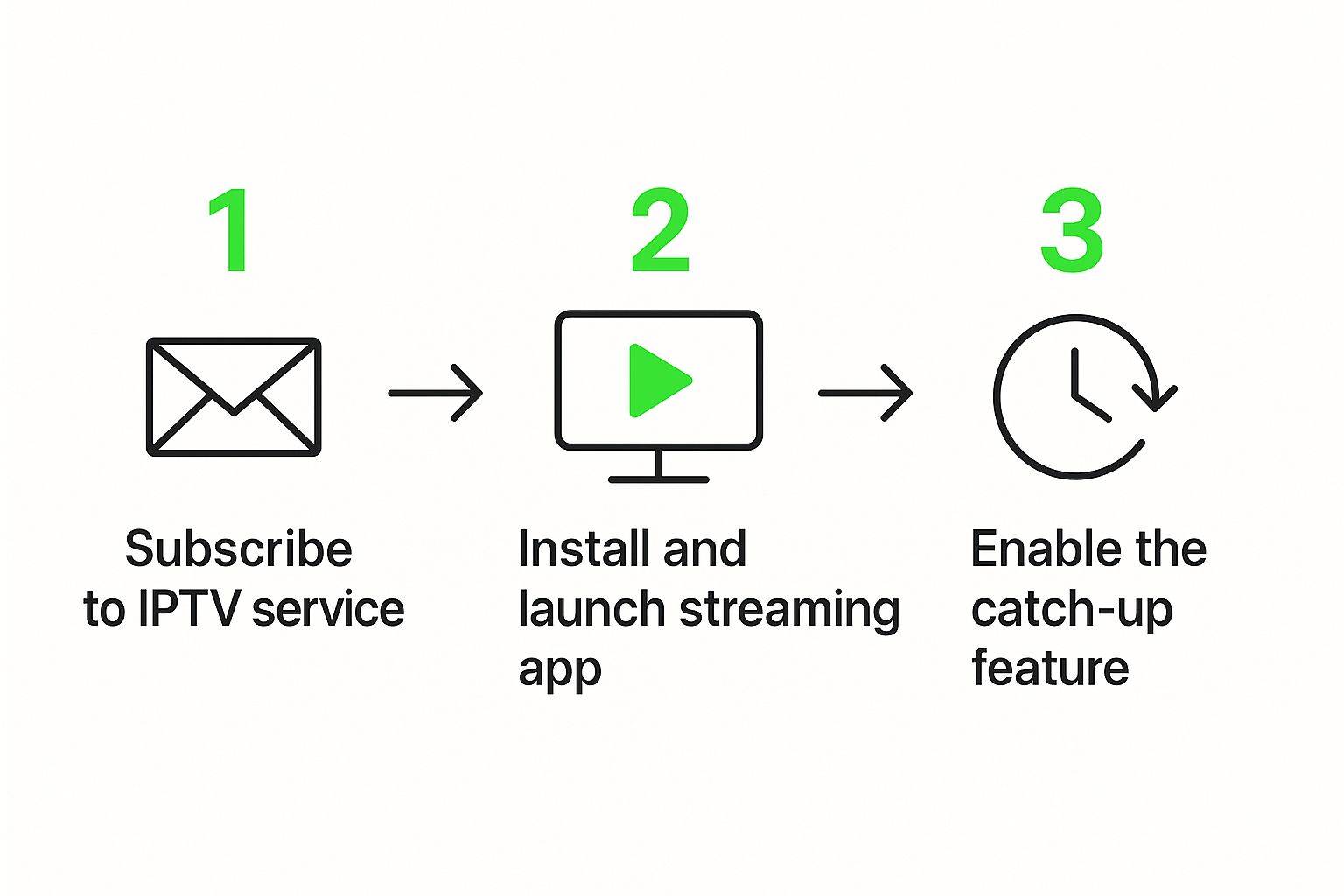
As you can tell, it's a straight shot—find the right service, get the right app, and then just flip the switch on the feature you need.
First things first, you need our player. Since the Free IPTV Player is browser-based, you can skip the whole app store headache. Just fire up the web browser on your Firestick (like Amazon Silk) and head over to our website.
Once you’re there, you'll see where to plug in your IPTV service details. Your provider should have sent you either an M3U URL or your Xtream Codes login info.
After you pop in your details, our player will get to work loading up your channel list and the Electronic Program Guide (EPG). A zippy device like the Amazon Fire TV Stick 4K Max will make this part feel almost instantaneous.
Now for the best part. With your channels all loaded up, open the EPG, or TV guide. You know, the grid that shows you what’s on now and what’s coming up later. This is where the catch-up magic happens.
Start scrolling backward in time through the guide. You'll see all the shows that have already finished. If your provider offers IPTV with catch-up, they'll flag these past programs with a little icon.
Look for a small rewind symbol, a play icon, or maybe a little clock face next to a show's title in the EPG. That's the universal sign telling you the program is ready to watch from the very beginning.
When you spot a show you missed, just select it and hit play, exactly like you would with a live channel. The stream will kick off right from the start of the program. From there, you can usually pause, rewind, and fast-forward, giving you full DVR-style control without ever having to remember to set a recording.
For a super smooth experience, especially if you're streaming 4K stuff, make sure your device has enough muscle. The NVIDIA SHIELD Android TV Pro is a beast of a machine known for handling even the most demanding IPTV streams without breaking a sweat.
And that's really all it takes. Follow these steps, and you’ll be using the catch-up feature in no time, making the fear of missing your favorite shows a thing of the past.
Alright, so you've got your IPTV catchup service up and running. That's a great start, but let's be honest, just getting it to work is only half the battle. Now it's time to go from basic user to pro. I'm going to share a few small but mighty tricks that will make your viewing experience a whole lot smoother, faster, and just plain better.
First things first, you need to become one with your Electronic Program Guide (EPG). Seriously, don't just scroll back aimlessly hoping to stumble upon what you're looking for. Most quality players have a search function baked right into the guide. Instead of spending five minutes swiping through yesterday's schedule to find that movie you missed, just type in the title. It's a simple move that saves a ton of time.
Also, get familiar with the catchup window your provider offers. Most services will hang onto recordings for 3 to 7 days. Knowing that limit helps you figure out what to watch first, so you don't log on only to find that season finale you were waiting for has vanished from the server.
Once you've fired up a catchup stream, the player controls are your new best friends. Learning to navigate the stream efficiently is what separates a frustrating experience from a great one, especially when you want to find a specific scene or skip the boring parts.
Learning these controls takes your viewing from passive to interactive.
The real power of an IPTV with catchup player isn't just watching old shows; it's the way it merges the immediacy of live TV with the total control of on-demand. Getting a handle on these playback features is what truly unlocks that potential.
The whole IPTV market has exploded, and a big reason for that is the demand for flexible features like catch-up TV. It's all about watching what you want, when you want. If you're curious about the industry trends, you can discover more insights about the expanding IPTV market on openpr.com.
Finally, and this is important, remember that how well all of this works depends heavily on your player. A solid platform like our own Free IPTV Player is built to handle these functions without breaking a sweat. You can check out our browser-based IPTV player to see how a clean, well-designed interface makes all the difference. When your player is optimized, fast-forwarding is smooth and the EPG is snappy, completely transforming your catchup experience.
So, you've got everything set up, but the catch-up feature is acting a little stubborn. It happens. Before you throw the remote, take a breath—most of these snags are surprisingly easy to sort out. This section is your go-to guide for squashing those common bugs and getting back to your show.
The classic complaint? Buffering that never ends or a stream that just refuses to start. More often than not, your internet connection is the culprit. A quick restart of your modem and router can work wonders. If that doesn't do the trick, try a speed test to make sure you have enough bandwidth to keep things flowing smoothly.
Another frequent headache is a wonky Electronic Program Guide (EPG). You scroll back to yesterday to catch a movie, but the guide is completely blank or, worse, showing the wrong programs. This is usually just a sign that the EPG data didn't load correctly the first time.
Sometimes, all your system needs is a quick digital "shake-it-off" to fix EPG and loading glitches. Think of it as a fresh start.
A little insider tip: sometimes the problem isn't on your end at all. If catch-up is failing for just one specific channel but works fine on others, the issue is probably with the provider's server for that stream. Just give it some time and try again later.
If your stream is pausing every few seconds to buffer, your network is the prime suspect. A weak or unstable Wi-Fi signal is a common cause, especially when you're trying to watch high-quality streams.
For a connection that's solid as a rock, you might want to consider upgrading your hardware. A more powerful streaming device like the Amazon Fire TV Cube not only has better Wi-Fi capabilities but also includes an Ethernet port. Plugging directly into your router with a cable almost always puts an end to buffering for good.
Finally, keep in mind that not every channel will have the IPTV with catch-up feature enabled. Providers usually reserve this for their most popular channels to save on server resources. If you don't see the little rewind icon on a particular channel, it’s a safe bet that your service doesn't offer catch-up for that specific broadcast.
Let's be honest, the days of rushing home to catch your favorite show at 8 PM sharp are pretty much over. We’ve all been spoiled by the likes of Netflix and Hulu, and now we expect our entertainment to wait for us, not the other way around. That old, rigid TV schedule just doesn't fit into our hectic lives anymore.
This is where IPTV with catchup swoops in to save the day. Think of it as the perfect middle ground. It gives you the live-action buzz of traditional television but with the incredible freedom of on-demand streaming. It’s a game-changer for everyone—from the die-hard sports fan who has to watch the match live to the busy parent who can only tune in after the kids are asleep.
The move toward on-demand everything is massive, and it’s not slowing down. Just look at the numbers. By early 2023, Netflix had racked up over 231 million subscribers worldwide. That's a huge chunk of the global population voting with their wallets for the freedom to watch what they want, when they want. You can dive deeper into these trends by checking out the full research on researchandmarkets.com.
This shift has totally rewired our brains. Features that put us in control aren't just a cool bonus anymore; they're a must-have.
Because we all expect this level of control now, catchup is quickly becoming an essential part of any decent IPTV service. It solves the biggest headache of live TV—its inflexibility—without taking away the shared excitement of watching a big event unfold in real time. Frankly, any provider not offering a solid catchup feature is going to feel ancient pretty fast.
Catchup TV isn't just about rewatching missed shows. It's about restoring consumer power, giving viewers the freedom to fit television into their lives, not the other way around.
To get a real sense of where catchup fits into the bigger picture, taking a look at a general streaming service comparison guide can be super helpful. It shows how features that make life easier for the user are driving the whole industry forward. As you start looking around, picking a service with a reliable catchup function is key to a modern setup. We’ve even put together a list of our top picks in our guide to the best IPTV providers in 2023.
At the end of the day, the future of streaming is all about you—your schedule, your choices. IPTV with catchup is a huge piece of that puzzle, making sure you never have to miss out, no matter what life throws at you. It’s simply the smarter way to watch TV.
At Free IPTV Player, we believe in giving you total control over your entertainment. Our browser-based player makes it easy to enjoy live TV and catchup features without any downloads or installations. Experience the future of streaming by visiting https://freeiptvplayer.net today.
