Yes, you can absolutely start streaming live tv free with nothing more than your web browser and a special link. It all works thanks to a neat bit of tech called IPTV, which beams television channels right over the internet. This lets you tune in on just about any device you own, no subscription or special app required.
Welcome to the world of cord-cutting! This is where getting live television doesn't automatically mean getting a massive monthly bill. The magic behind this freedom is IPTV, which is short for Internet Protocol Television. Instead of a clunky cable box or a satellite dish on your roof, IPTV sends live channels straight to your screen through your internet connection.
The key that unlocks all this content is a simple web link, usually called an M3U playlist. Just think of it like a digital address book; it tells an IPTV player exactly where to find the live feeds for hundreds, sometimes even thousands, of channels. Our free online IPTV player is built specifically to read these M3U links, giving you a dead-simple way to watch whatever you want without any headaches or complicated setup.
Making the switch to watching TV in your browser has some pretty sweet advantages. The most obvious one is saving money by ditching those pricey cable and satellite contracts. But beyond that, you open the door to a massive variety of channels from all over the globe—way more than you'd ever get in a standard package.
This approach gives you a level of flexibility you just can't get otherwise:
This whole shift to internet-based viewing isn't just some niche trend anymore. It's how most of us watch TV now. In fact, as of May 2025, streaming services officially hit 44.8% of total television usage, beating out traditional broadcast and cable TV combined for the first time ever. You can read more about this viewing milestone right from the source.
While our player works great in any browser, using the right gear can really take your viewing experience up a notch. A dedicated streaming device hooks right into your TV and gives you a stable, high-quality picture that’s perfect for the living room couch.
For a setup that's both powerful and reliable, you might want to look at something like the Amazon Fire TV Stick 4K. It’s a fan favorite for its snappy performance and super simple interface. No matter what you choose, this guide will walk you through every step, from finding channels to kicking back and enjoying the show.
Here's the real secret to streaming live TV for free: the player is just the vehicle, but the playlist is the fuel. An M3U playlist is what powers your entire IPTV experience, and honestly, finding a good, reliable one is the most important part of this whole process.
Think of it as a treasure map leading to thousands of channels. Your mission is to find the maps that are accurate and lead to actual treasure, not just a bunch of dead ends.
This hunt for playlists can take you to some interesting corners of the internet. Many are shared freely and legally by communities of enthusiasts on public forums, certain Reddit communities, and even code-sharing sites like GitHub. These are the places where people compile and share lists of publicly broadcasted, free-to-air channels.
Jumping into the search can feel a bit overwhelming, but using the right keywords makes all the difference. Just searching for "free IPTV" is a surefire way to get lost in a sea of questionable links. You've got to be more specific.
I've found these search terms work best:
public IPTV channels GitHubfree M3U playlist [your country]legally free IPTV stream linksThese targeted searches help you cut through the noise and point you toward repositories where hobbyists maintain lists of legal streams. GitHub is a goldmine for this, as developers often curate lists of publicly available channels from around the world as personal projects. You can browse through these lists to find one that fits your needs, but be prepared—the quality and stability can be all over the place.
A common frustration with free M3U lists is their lifespan. A link that works perfectly today might be a dead end tomorrow. This happens because the streams are often maintained by volunteers, and links can change or be taken down without notice.
This is the most critical part of your search: knowing the difference between a legal stream and a pirated one. You want to stream with peace of mind, right? Staying on the right side of the law is essential.
A good rule of thumb is if a channel is freely available over the air in its home country—like your local news or public access channels—its stream is likely legal.
On the flip side, if you stumble upon a playlist offering premium cable channels or brand-new movies for free, it's almost certainly pirated. Legitimate free playlists stick to public domain content and free-to-air broadcasts. To get a better handle on how these files work, you can check out our detailed guide on mastering the IPTV experience with M3U playlists.
For those who'd rather skip the hunt and guarantee a stable, high-quality experience, a premium service is a great alternative. We recommend our trusted affiliate, IPTV Now. They offer a reliable and massive channel lineup without the uncertainty of free lists, giving you a hassle-free way to enjoy live TV.
Alright, you've done the legwork and found a promising M3U playlist. Now for the fun part: bringing those channels to life. Getting everything up and running with our browser-based tool is incredibly simple, designed to get you from a link to live TV in less than a minute.
The real beauty of this method is the total lack of installation. No software to download, no apps to update. All you need is your web browser and the M3U URL you just found.
First things first, copy your M3U playlist URL. With that ready on your clipboard, head over to our player. You’ll see a clean, simple input field right there waiting for you.
Just paste your link directly into that box and hit the "Play" button. That’s it. Our player instantly gets to work, processing the playlist, grabbing the channel list, and prepping the streams for you.
Our player's whole purpose is to cut through the technical jargon. You don't need to be an IPTV expert to use it. The platform handles all the complicated stuff behind the scenes, letting you focus on what actually matters—finding something good to watch.
Of course, for the best experience, you'll want to make sure your setup is ready to go. This simple flow chart breaks down the essentials for a smooth stream.
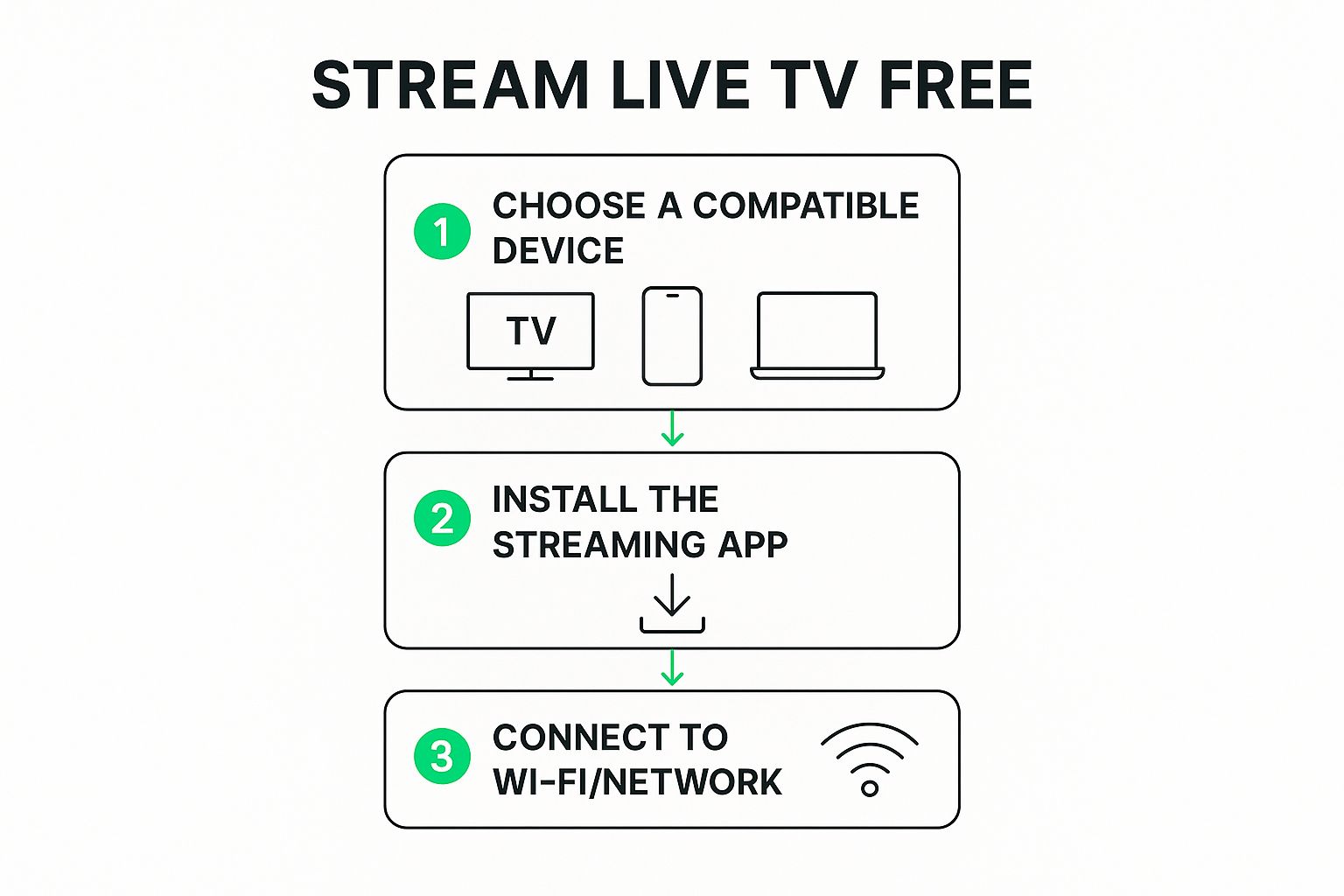
As you can see, a compatible device and a solid network connection are the building blocks for a great viewing session. And since our player is entirely browser-based, you can completely skip the app installation step.
Once your playlist loads, you'll see a list of available channels pop up, usually on the side of your screen. Think of this as your new remote control. You can scroll through this list to see every single channel the playlist offers.
Before you dive in, it helps to know what all the buttons and options do.
This quick reference guide explains the key features you'll use in our free online IPTV player and what they do.
| Feature | What It Does | Why It's Useful |
|---|---|---|
| Channel List | Displays all available channels from your M3U playlist. Click any name to start the stream. | Your main navigation tool. It’s like a TV guide for channel surfing. |
| Category Filters | Organizes channels into groups like "News," "Sports," or "Movies." | Helps you find what you're in the mood for without endless scrolling. |
| EPG (Program Guide) | Shows what's currently playing and what's scheduled next if your playlist supports it. | Makes the experience feel more like traditional TV, letting you plan your viewing. |
| Favorites | Allows you to "star" or save your most-watched channels into a separate, easily accessible list. | Creates a personalized shortlist of your go-to channels for quick access next time. |
These features are designed to make finding and watching your content as easy as possible.
Here’s a quick rundown of how to use them:
For a deeper dive into the interface, you can explore our dedicated page for the online M3U player, which breaks down every single feature in detail.
While the player works great on any browser, for a truly optimized setup, you might want to look into a dedicated streaming device like the Amazon Fire TV Stick Lite. It can offer a more stable connection and gives you a classic remote for a familiar, lean-back TV experience.
There's nothing more frustrating than settling in to watch a live event, only to be met with a constant buffering wheel or a picture that freezes every few seconds. Getting your M3U playlist loaded is just the first step. The real magic happens when your setup can deliver a smooth, crystal-clear picture without any hiccups.
Your internet connection is the absolute foundation of a good streaming experience. While our player is designed to be lightweight, a slow or spotty connection will always struggle with the demands of live video. You don't need to break the bank on the fastest plan available, but stability is non-negotiable. For a deeper dive, we've put together a full guide on how to optimize your internet connection for streaming.
Watching on a laptop browser is great for convenience, but it’s often not the best choice for your main TV. Your computer is constantly juggling dozens of other tasks in the background, from email notifications to system updates, all of which can steal resources and disrupt your stream.
A dedicated streaming device, however, is built for one thing and one thing only: delivering high-quality video.
These little gadgets are fine-tuned to handle video streams with maximum efficiency, which almost always results in a smoother picture. Plus, they come with a remote, bringing back that classic, comfortable feeling of channel surfing from your couch.
If you're looking for an affordable upgrade that punches way above its weight, I always recommend the Amazon Fire TV Stick 4K. It's a fantastic piece of hardware that handles HD streams like a champ and can make a night-and-day difference in your viewing quality.
Sticking with your browser? No problem. There are still a few simple things you can do to give it a performance boost. One of the quickest and most effective tricks is to clear your browser's cache. Over time, your browser piles up tons of temporary files that can seriously slow things down.
Think of your browser cache like a cluttered desk. Clearing it out gives you a clean workspace, which can often solve mysterious performance issues and get your stream running smoothly again.
Another pro tip is to just close your extra tabs. Every single tab you have open is eating up a little piece of your computer's memory and processing power. Shutting down everything you aren't actively using frees up those resources for what matters—your stream. These small habits can make a huge difference.
The global appetite for streaming is massive, with the market projected to hit $674.25 billion in 2025. This explosive growth means streams are only getting higher in quality, making an optimized setup more important than ever. You can discover more insights on these video streaming statistics to see just how fast things are moving.
Finally, think about using a Virtual Private Network (VPN). A VPN does more than just protect your privacy; it encrypts your connection, which can help you get around any speed throttling your internet provider might be imposing on video streams. As a bonus, it can also help you access public streams that are locked to specific regions, opening up a whole new world of content.
Sooner or later, even with a perfectly tuned setup, you're going to hit a few snags streaming live TV for free. It’s just the nature of the beast when you're dealing with publicly shared M3U playlists. The real trick is knowing how to quickly figure out what's wrong and fix it so you can get back to your show.
When a stream starts to get fussy, don't sweat it. Most problems fall into a handful of common buckets, and the solutions are often way simpler than you'd think. From a playlist that won't load to that dreaded buffering wheel, we’ll walk through how to handle it.
The most common headache by far is an M3U playlist that just refuses to load. Before you start pulling your hair out, double-check the URL. Seriously. A tiny typo, an extra space at the end, or a single missing character is the real culprit more than 90% of the time. Copy and paste it again, very carefully.
That endless buffering circle is the classic sign of a bottleneck somewhere between the stream's source and your device. While it could be your internet, it’s more often an issue with the stream source itself being overloaded with too many people watching at once.
If you notice only one specific channel is buffering or just showing a black screen while others are working fine, the problem is almost certainly not on your end. The source for that particular channel is probably just down.
Here’s a quick game plan:
It's important to remember that free, public streams come with zero guarantees. Channels can go down, disappear, or stop working without any warning. That’s the trade-off for not paying a monthly subscription fee.
It’s a tale as old as time: you find an amazing playlist, your favorite channel is crystal clear for weeks, and then one day... poof. It's gone. This happens because the links inside M3U files aren't set in stone. The broadcaster might have changed the stream's URL, or the person who maintains the free list may have simply removed it.
While live content now makes up 23% of all global viewing time, its delivery through these free channels can be much less reliable than on-demand services. The demand is huge—YouTube alone saw 3.7 billion hours of live content watched in a single quarter. This popularity puts a massive strain on the unofficial sources found in free M3U lists. You can learn more about these live streaming trends to see just how much viewing habits are changing.
Unfortunately, there's no real "fix" for a channel that's been removed other than to hunt for a new playlist that has it.
Jumping into the world of streaming live TV for free can feel a bit like the wild west. It's exciting, but you've probably got a few questions buzzing around. From legal stuff to techy details, let's clear the air so you can stream with confidence.
This is the big one, and rightly so. Let’s get straight to it: using an IPTV player like ours is 100% legal. Think of the player as just a tool, no different from Google Chrome or the video player on your computer. It doesn't host or provide any content itself.
The real question is about the source of the channels you're watching. Streaming public, over-the-air broadcasts—like your local news station—is perfectly fine. The legal gray area turns into a hard "no" when you're streaming copyrighted content like premium sports, movies, or cable channels from an M3U playlist that isn't licensed to share them. Our guide is all about helping you tap into the massive world of legally available public content.
Ah, the most common headache of using free M3U playlists. One minute you're watching your show, the next... static. It's frustrating, but it's part of the territory. These free lists are usually run by hobbyists and volunteers, which means there's no service guarantee. A link can break, a source can shut down, or the whole list can just become outdated overnight.
When a channel goes dark, here's what the pros do:
The unpredictable nature of free playlists is the trade-off for not paying a monthly bill. I like to think of it as part of the adventure. A little searching is sometimes needed, but the savings can be huge.
Not at all! And that’s one of the best parts. Our IPTV player is built to work right in your web browser. That means any device that can get online—your laptop, tablet, or smartphone—is already a TV.
Now, if you want that classic couch-and-remote experience on your big-screen TV, a dedicated streaming device is a great move. They're built for one thing: streaming video. You'll often get a smoother, more stable picture than you would from a computer browser.
A super affordable option like the Amazon Fire TV Stick can turn any TV into a streaming powerhouse. It's a breeze to set up and gives you that familiar "lean-back" experience we all know and love.
DVR functionality is generally a feature you'll find in paid IPTV services or more complex, downloadable software. Most free, browser-based players like ours are designed for one purpose: giving you instant, simple access to live TV.
We've focused on doing that one thing exceptionally well. Our player lets you jump right into live streams without any downloads or installations. If recording is a must-have for you, you'll need to check out dedicated IPTV apps that have that feature built-in or consider a premium service that often includes cloud DVR.
Ready to start watching without the fuss of downloads or installations? Free IPTV Player puts live TV right in your browser. Just grab a playlist link, paste it in, and you're good to go. Try our free online IPTV player today!
