So, you want to watch IPTV online for free? It really only boils down to two things: a free M3U playlist file (which is just a list of links to TV channels) and a good IPTV player.
You can often find these M3U playlists publicly shared on places like GitHub. Once you have one, you can use a browser-based tool like our Free IPTV Player to load it up and start watching instantly. The best part? No downloads, no installations. It’s about as direct as it gets.
Diving into IPTV might seem a bit technical at first, but I promise it's much simpler than it looks. At its heart, IPTV is just a super flexible way to stream TV over the internet, and this guide is all about showing you how to do it for free. We'll walk through the essentials, from finding those public M3U playlists to using a solid online player to watch the content.
Let's skip the confusing jargon and get straight to the practical stuff. All you really need is a decent internet connection and a device with a web browser, like a powerful Amazon Fire TV Stick 4K Max. That's it. Think of this as your roadmap to getting started, with our player as the simple, central tool to make it all happen smoothly.
If you want to get a bit more background, you can check out our detailed guide on what IPTV is and how it works for a deeper understanding.
The move from old-school cable to online streaming isn't just a trend; it's a massive shift. The global IPTV market is huge, valued at around $187.01 billion with more than 250 million subscribers around the world.
While big subscription services used to be the only game in town, free, ad-supported streaming is exploding. It's actually the fastest-growing part of the market and is expected to grab a huge slice of the pie. This tells you one thing loud and clear: people want more flexible and affordable ways to watch their shows. You can explore the full market analysis if you're curious about the numbers.
This rapid rise underscores how IPTV is redefining global entertainment, making online streaming more accessible and diverse for users worldwide.
Before we jump in, here’s a quick checklist to make sure you have everything you need. Think of it as your pre-flight check for streaming.
This table gives you a quick overview of the key components you'll need to get set up for free IPTV streaming.
| Component | What You Need To Do | Why It Matters |
|---|---|---|
| A Reliable Internet Connection | Make sure you have a stable Wi-Fi or wired connection. | IPTV streams video in real-time. A slow or choppy connection means buffering and frustration. |
| A Compatible Device | Grab a smartphone, tablet, laptop, or smart TV with a web browser. | This is what you'll use to access the player and watch content. No special hardware is needed. |
| An M3U Playlist URL | Find a publicly available M3U playlist from a trusted source online. | This is your channel guide. The M3U file tells your player where to find the streams. |
| An IPTV Player | Use a web-based tool like our Free IPTV Player. | This is the software that decodes the M3U playlist and plays the video streams on your device. |
With these four things sorted, you're officially ready to start streaming.
Our main goal here is to help you explore this world safely and effectively. For more articles and tips on all things streaming, the Edgevista Blog for Streaming Insights is a great place to find deeper dives into related topics.
The heart and soul of any good IPTV setup is the M3U playlist. You can think of it as a digital TV guide—a simple file packed with links that tell our player where to find all the live streams. The real trick isn't using the playlist, but tracking down a good, reliable one.
Thankfully, the web is bustling with communities dedicated to sharing publicly and legally available playlists. You just need to know where to look.
Your hunt for a playlist to watch IPTV online for free will usually start on sites like GitHub or in public forums. The key is to get specific with your search terms. Try queries like "public IPTV M3U playlist" or "free IPTV channels GitHub." This will lead you straight to repositories where enthusiasts gather and update lists of streams that are perfectly legal for public viewing.
Here’s the thing: not all playlists are created equal. You can save yourself a lot of frustration by learning to spot the good ones before you even try to load them.
A well-maintained playlist often has its channels sorted into categories, like "News," "Sports," or by country. This simple bit of organization is a huge clue that someone is actively managing it.
Vetting a playlist beforehand saves you from the headache of loading a file full of dead links. A quick look at the file's structure can tell you a lot about its potential reliability and whether the channels are likely to work.
Another pro tip is to check the file's structure. A valid M3U file follows a specific format. If you’re curious about the technical side of things, you can even check out our guide on how to create an M3U playlist to see what makes them tick. Knowing this makes it much easier to identify a poorly made or fake file.
Here's a quick checklist I use when vetting a new playlist:
#EXTM3U? If you see a jumbled mess or get an error page, it’s a dud.Alright, you've got a solid M3U playlist. Now what? The next piece of the puzzle is making sure your hardware can keep up. The device you use to watch free IPTV can be the difference between a frustrating, buffer-filled mess and a smooth, enjoyable stream.
Let's walk through the best gear for the job.
It really comes down to this: your choice of hardware directly impacts your stream quality. While our player works on any browser, devices with more processing power and better network connections are always going to give you a better experience.

This is becoming more critical as the IPTV world absolutely explodes. Projections show the market rocketing from $86.47 billion in 2025 to a massive $346.44 billion by 2034, and a huge part of that is smart TV adoption. This boom means higher-quality streams are the new normal, making capable hardware like an Android TV Box a must-have. You can explore more about these IPTV market trends to get a sense of where things are headed.
For that classic living room, big-screen experience, an Amazon Fire Stick is tough to beat. I personally recommend the Fire TV Stick 4K Max. Its processor is a beast and the Wi-Fi 6 support is specifically built to handle high-def streams without that dreaded lag.
But what if your Wi-Fi is acting up? Before you go blaming your internet provider, the problem is often just a weak wireless signal. A simple AmazonBasics Ethernet Adapter for your Fire Stick can fix this instantly by giving you a stable, wired connection. It's a cheap fix that solves most buffering issues.
Think of your device as the final link in the streaming chain. Spending a little on the right hardware—whether it's a good streaming stick or a simple adapter—pays off big time with a buffer-free picture.
Of course, you don't always need a dedicated device. Streaming directly on your laptop or smartphone is perfect for watching on the move.
And for those who want a more permanent, high-quality solution without fiddling with external gadgets, a premium subscription service like IPTVNow is a great option. They offer dedicated, top-tier streams directly to your smart TV or preferred device with minimal fuss.
Alright, you've got your M3U playlist. Now for the fun part: getting it up and running so you can start watching.
We designed our free online IPTV player to be as simple as humanly possible. No complicated installs or confusing settings. The goal was to let you go from finding a playlist to watching your favorite content in just a couple of clicks.
The whole process is intentionally straightforward. Just head over to our online M3U player in your web browser. You'll see a clean, simple interface with one single input field waiting for you. This is where you'll paste that M3U playlist URL you tracked down.
Once the link is pasted in, just hit the "Play" button. Our player takes it from there, instantly loading and organizing all the channels from your list.
As soon as your playlist loads, you'll see everything sorted and ready to go. The player usually organizes channels by the categories already set up in the M3U file, which makes finding what you want to watch a breeze.
You can easily scroll through the channel list, or if you know exactly what you're looking for, just use the search bar to find a specific channel by name. A really handy feature is the ability to create a favorites list for one-click access to the streams you watch most.
We built these features to make watching IPTV online free of the usual headaches. Whether you're a seasoned streamer or this is your first time dipping your toes into the IPTV world, the experience should feel seamless.
Before you jump in, it's always smart to have a safe streaming workflow in mind. This infographic breaks down a simple, three-step process for a safer free IPTV experience.
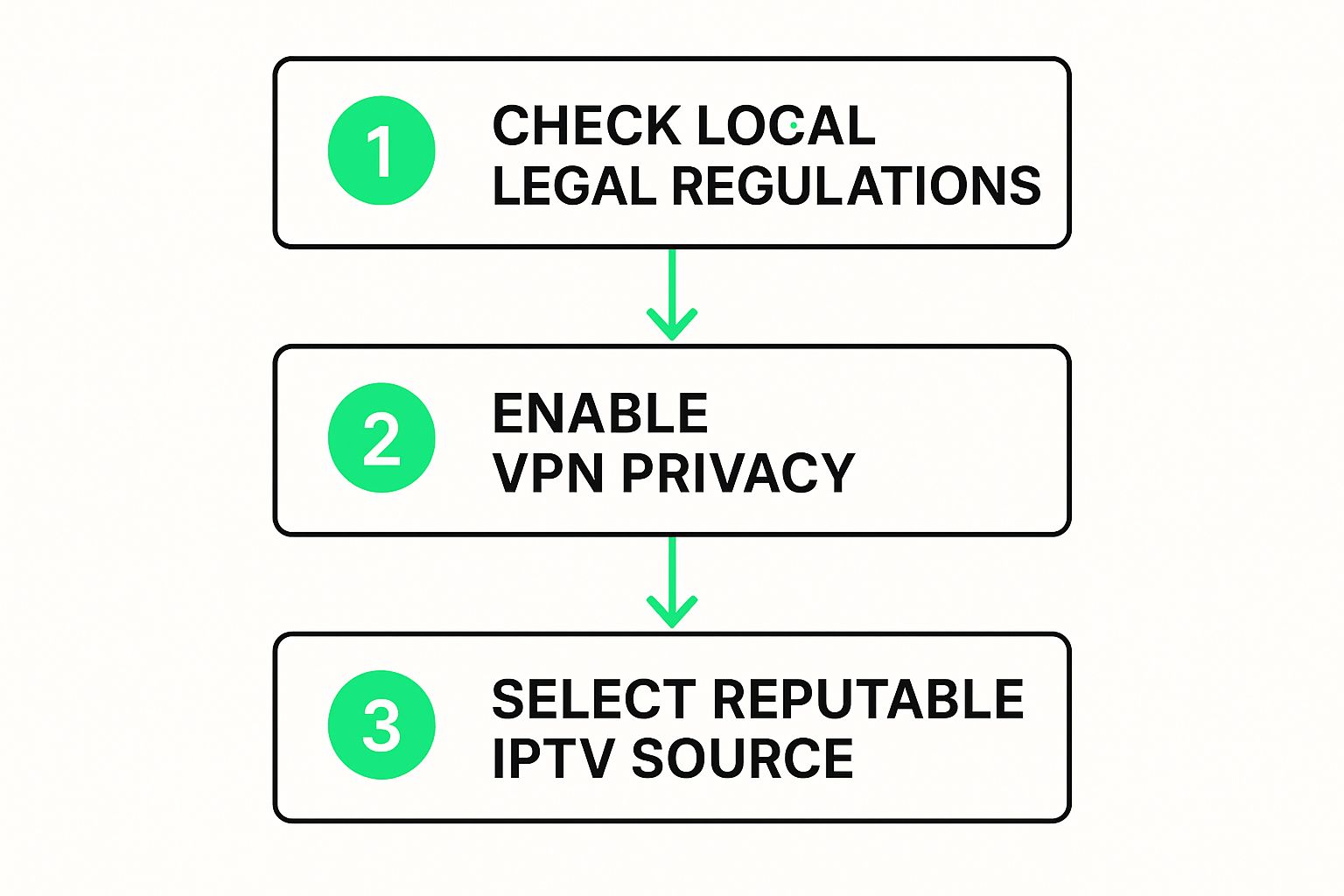
This process really boils down to three key things: understanding your local laws, protecting your own privacy, and sticking with reputable sources. By keeping these simple steps in mind, you can minimize the risks while you kick back and enjoy your content.
It's one thing to get a stream working, but it's another thing entirely to get that flawless, buffer-free picture we're all after. Let's dig into the common headaches that can totally ruin a movie night and walk through some simple, effective ways to fix them.
More often than not, the prime suspect behind that dreaded buffering wheel is your network connection. Wi-Fi is incredibly convenient, sure, but it's also prone to all sorts of interference. If you have the option, plugging directly into your router with an Ethernet cable will give you a much more stable and speedy link—which is absolutely critical for high-quality streaming.
If you're stuck with Wi-Fi, don't despair. Upgrading your gear can make a world of difference. A powerful device like the Amazon Fire TV Stick 4K Max is built to handle heavy-duty streams, especially with its Wi-Fi 6 support. For those with bigger homes plagued by spotty coverage, a Wi-Fi Extender can be a real game-changer, wiping out those frustrating dead zones for good.
Another incredibly useful tool for your streaming setup is a Virtual Private Network, or VPN. A good VPN wraps your internet traffic in a layer of encryption, which can actually help you get around any throttling your ISP might be doing to slow down video streams. Plus, it adds a much-needed layer of privacy to everything you do online.
A VPN is more than just a privacy tool; it can be a game-changer for streaming performance by preventing your internet provider from slowing down your connection simply because you're watching video.
It's also worth remembering that free M3U playlists don't last forever. The links inside them can go dead as sources change or get taken down. Make a habit of finding fresh, updated playlists every so often to make sure your channels stay live. For a deeper dive, check out our guide on how to optimize your internet connection.
One last thing—consumer interest in IPTV hardware, especially streaming boxes, tends to spike around October each year. This pattern suggests a lot of people are upgrading their setups at specific times to get a better experience. It’s a good reminder that having the right gear is just as important as having a good connection.
When you're first dipping your toes into the world of free IPTV, a few questions always seem to pop up. Let's tackle some of the most common ones so you can get started with confidence.
Lots of people wonder about the legality of it all. Here’s the deal: the legality really comes down to the source of the content. Using publicly shared M3U playlists that link to channels already broadcast for free is generally not an issue. The legal gray area starts to creep in when a playlist offers premium, copyrighted channels without the right licenses. The best advice? Always stick to reputable sources for your M3U lists to stay on the right side of things.
The biggest distinction between a free M3U playlist and a premium subscription, like something from IPTVNow, really boils down to three key things: reliability, quality, and support.
Free playlists are a fantastic gateway to IPTV, but they can be a bit of a wild card. Channels might buffer endlessly, drop out right in the middle of a show, or just vanish forever. This usually happens because the streams are maintained by hobbyists and volunteers, so stability isn't always a guarantee.
Paid services are a whole different ballgame. You're paying for a curated, stable experience running on dedicated servers. That means less buffering, consistent HD (or even 4K) quality, and someone to contact if things go haywire. Essentially, you're paying for peace of mind.
Think of it like buying a streaming device. A basic stick will get the job done, but a high-end Android TV Box delivers a much smoother, more dependable performance every single time you want to watch something.
First off, don't panic if your favorite playlist suddenly goes dark—it happens all the time with free sources. Your first move is simple: hunt for a new, recently updated M3U playlist. Like we mentioned earlier, communities on GitHub and various public forums are goldmines for fresh links.
But before you toss the old playlist, give it one more shot in our player. Sometimes, it's just a temporary server hiccup that sorts itself out. If it's still dead in the water, it’s time to cut your losses and find a new stream.
At Free IPTV Player, our goal is to give you the tools to make streaming simple and accessible. Just grab an M3U playlist, load it up, and start watching instantly on our browser-based player.
