Cutting the cord and watching live TV without a cable subscription is way easier than you might think. We're going to walk through three of the best ways to do it: tapping into local channels with an Over-the-Air (OTA) antenna, checking out free ad-supported streaming services, and opening up a world of content with an IPTV player.
These aren't just workarounds; they're genuine, cost-effective replacements for that pricey cable bill.
Let's be real—the number one reason most people ditch cable is to save a ton of money. But what if you could cut that cord without giving up live sports, your local news, or your favorite network shows? It's totally possible.
You can swap out that clunky, expensive cable box for smarter, more flexible options that actually put you in charge. No more long-term contracts or paying for hundreds of channels you never, ever watch.
This isn't just a small trend; it's a massive shift in how we all watch TV. The numbers don't lie. By May 2025, streaming services captured a whopping 44.8% of total television usage. That's the first time streaming has officially overtaken both broadcast and cable TV combined, and a huge jump from where things were in 2021. Platforms like YouTube and Netflix are completely changing the game, moving us all toward watching what we want, when we want.
This guide is here to break it all down for you, showing you exactly how to join the cord-cutting club. We'll explore the best methods out there today so you can find the perfect setup.
Before we dive deep, let's get a quick overview of your options.
This table gives you a quick comparison of the main ways to watch live TV without a cable subscription, helping you decide which path is right for you.
| Method | Cost | Channels Available | Best For |
|---|---|---|---|
| Over-the-Air (OTA) Antenna | One-time hardware cost | Local broadcast channels (ABC, NBC, CBS, FOX, etc.) | Viewers who primarily want local news, sports, and major network shows for free. |
| Free Streaming Services (FAST) | Free (with ads) | Hundreds of niche and curated live channels | People who want a cable-like experience with a variety of channels without any cost. |
| IPTV Player | Varies (player is often free, playlists may have a cost) | Thousands of global and specialized channels | Tech-savvy users looking for the ultimate customization and a vast selection of international content. |
Each of these methods offers a unique way to get your live TV fix. Now, let's get into the details of each one.
Here’s a look at what we’ll cover:
The future of television is about watching what you want, when you want, without the hefty bill. This is your practical roadmap to becoming a savvy cord-cutter and taking back control of your entertainment.
With these methods, you can build a setup that’s not just cheaper but is perfectly tailored to how you actually watch TV.
Long before streaming became the norm, the trusty antenna was everyone's ticket to free live television. Believe it or not, it’s still one of the best ways to cut the cord. Today's modern HD antennas are leagues better than the old rabbit ears, pulling in major local networks like ABC, NBC, CBS, FOX, and PBS in beautiful, uncompressed high definition.
This is cord-cutting in its purest form. You buy the hardware once, and you get a lifetime of free local channels.
Here's the kicker: over-the-air (OTA) broadcasts often have better picture quality than cable or even streaming. Why? Because the signal isn't heavily compressed to travel over the internet. This means your local news and big sporting events can look incredibly sharp and clear, often even better than what you'd pay for.
Getting a great OTA experience really boils down to one thing: choosing the right antenna for where you live. The single most important factor is how far you are from the broadcast towers.
Before you spend any money, use an online tool to check which channels you can get at your zip code. It'll give you a realistic idea of what to expect and guide you toward the right type of antenna. If you're thinking about a more serious outdoor setup, it’s a good idea to understand the real cost of a new TV aerial and installation so you can make a smart choice.
Honestly, where you put your antenna can make or break the whole experience. I learned this myself when I moved an indoor antenna just a few feet and magically picked up three channels I didn't have before.
My personal tip is to start by placing your antenna as high as you can and as close to a window as possible. Run a channel scan on your TV to see what you get. Then, move the antenna just a little bit and scan again. A tiny adjustment can be the difference between a glitchy screen and a perfect signal.
Don't be afraid to experiment. Sometimes the spot that makes the least sense is the one that pulls in the strongest signal. By taking a little time to get the setup right, you unlock a completely free and high-quality way to watch live TV without cable. It’s a foundational piece of any true cord-cutter’s setup.
Can you really get hundreds of live channels at your fingertips without paying a dime? It might sound too good to be true, but it's the new reality of Free Ad-Supported Streaming TV, or FAST. Think of services like Pluto TV, Tubi, and The Roku Channel—they're completely changing the game for people who want to watch live TV without a cable bill.
What these platforms do is give you that familiar channel-surfing experience, but it’s all powered by ad breaks instead of subscription fees. You’ll find everything from 24/7 news and dedicated movie channels to streams playing classic TV show marathons on a loop. The deal is straightforward: you watch some commercials, and in return, you get a ton of content for free. It’s a model that has absolutely exploded in popularity.
This move away from traditional cable isn’t just a feeling; the numbers back it up. A recent report found that a whopping 85% of people stream online TV every single day. FAST services have become a central part of how many households get their entertainment, giving us more legitimate, no-cost options than ever before.
The best part about FAST is how simple it is. No contracts, no credit card info needed, and no complicated setup. You just download the app on your TV, phone, or streaming stick and start watching.
Here’s a quick rundown of the big players:
I've tested these services on just about every device, and my advice is to use a dedicated streaming stick. You can watch in a web browser, sure, but something like an Amazon Fire TV Stick 4K delivers a much smoother, lag-free experience when you're flipping through hundreds of channels.
These platforms are a fantastic way to dip your toes into the world of cord-cutting. They give you that comfortable, cable-like feel without the scary monthly bill, making the switch feel natural.
Of course, they won’t completely replace a premium cable package if you need specific live sports or brand-new shows. But for zero cost, the amount of content you get is seriously impressive. If you want to explore even more options, check out our guide to the best free TV streaming services available today.
If you want the ultimate control and a truly staggering variety of channels, nothing really beats IPTV. Put simply, Internet Protocol Television (IPTV) pipes live TV channels directly through your internet connection. This method opens up a world of content far beyond what traditional cable or even free streaming apps can touch.
We're going to focus on using a free IPTV player, which is basically a powerful media organizer for all these channels. The player itself is a free tool, but to bring it to life, you need a channel list—often called an M3U playlist. You find this playlist yourself, which is what gives you total command over your viewing experience.
Getting IPTV up and running is probably easier than you think. You just need three things: a compatible streaming device (like a Fire Stick or an Android TV box), a steady internet connection, and that M3U playlist we just mentioned. For a reliable and massive channel list, we highly recommend our affiliate service, IPTV Now, which hooks you up with thousands of channels.
The setup process is pretty much the same no matter what device you're using. This visual guide breaks down the essential first steps for anyone looking to watch live TV without cable.
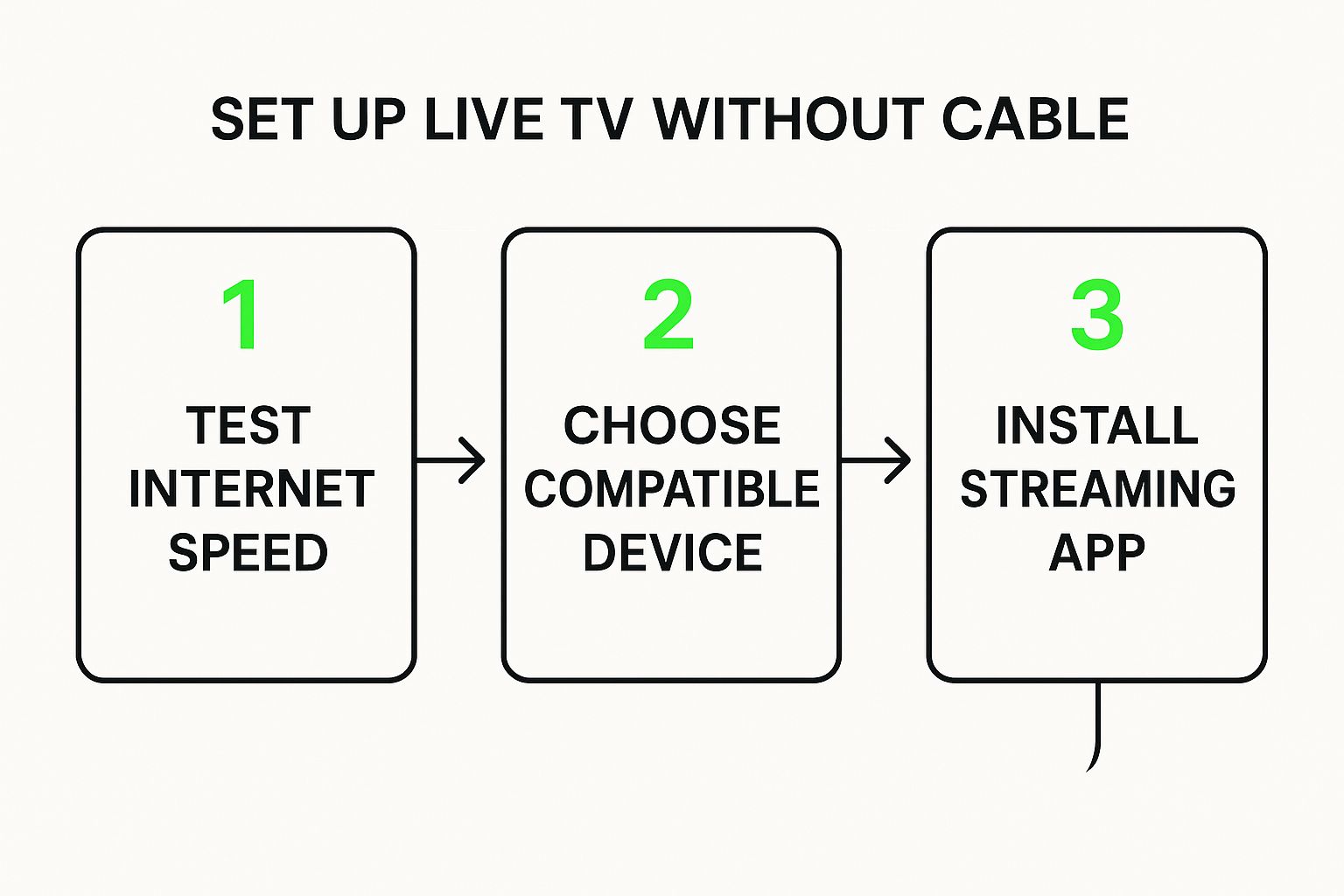
As you can see, it all starts with the basics: checking your internet speed and picking the right hardware before you even think about installing an app. Get those right, and you're set for a smooth ride.
Let's walk through a real-world example: setting up our Free IPTV Player on an Amazon Fire TV Stick. This is one of the most popular gadgets for IPTV, mainly because it's so affordable and flexible. It's a cord-cutter's favorite for a reason.
First things first, you'll need to get the player installed. Once the app is ready to go, the next move is to load your M3U playlist. The app will prompt you for the M3U URL you got from your playlist service.
Pro Tip: When you get your M3U playlist URL, immediately save it somewhere safe, like a notes app on your phone. This makes it way easier to copy and paste into the player instead of pecking out that super-long address with your TV remote, which is a recipe for typos and frustration.
Once you pop in the URL, the player will start loading all the channels. This might take a minute or two if you have a huge list, so be patient. When it's done, you'll have a full channel guide at your fingertips, ready to explore. You can dive deeper into this process in our guide on the best IPTV M3U player.
Okay, seeing thousands of channels can feel a bit like drinking from a firehose at first. But a good IPTV player gives you the tools to tame the chaos. You'll want to look for features that let you:
This is the kind of customization that really makes IPTV shine. It’s a powerful streaming method that mirrors the explosive growth we're seeing across the digital media world. The live streaming industry is absolutely booming; in Q2 2025 alone, livestreams generated over 29.6 billion hours watched on major platforms. That stat, which you can read more about in this report on the global livestreaming landscape on StreamsCharts.com, shows a massive global hunger for real-time content.
By mastering a simple player, you tap directly into this global network and build a personalized, powerful way to watch live TV without cable.
Let's be real: your cord-cutting setup is only as good as the hardware running the show. Think of your streaming device as the new-and-improved cable box—it’s the brain of your entire entertainment system. Picking the right one is the difference between a smooth, buffer-free experience and a glitchy, frustrating mess.
I've seen it happen too many times. A sluggish, underpowered device can turn the final minutes of a big game into a pixelated nightmare. That’s why investing a little in the right gear pays off big time down the road. You don't need the most expensive gadget out there, but you do need one that can handle modern streaming without breaking a sweat.
When you’re diving into IPTV and other high-quality streaming apps, processing power and storage are everything. The cheaper, older devices often just don't have the muscle to decode high-bitrate video streams, and that's when the dreaded lag kicks in.
That’s exactly why a few specific devices have become the darlings of the cord-cutting community. They just work.
Here are a couple of my top recommendations:
To see how these and other popular gadgets stack up against each other, take a look at our detailed streaming device comparison guide.
Finding the perfect streaming device can feel overwhelming, but a few key players consistently rise to the top for their reliability and performance, especially when it comes to live TV and IPTV. I've put together this quick comparison to highlight the devices I personally recommend to friends and family who are making the switch.
| Device | Key Feature | Ideal For | Amazon Affiliate Link |
|---|---|---|---|
| Amazon Fire TV Stick 4K Max | Wi-Fi 6E Support | The average user who wants a fast, reliable, and affordable 4K streaming experience. | View on Amazon |
| NVIDIA SHIELD TV Pro | AI-Enhanced Upscaling | Power users and home theater enthusiasts who demand the absolute best performance for 4K content and gaming. | View on Amazon |
| Roku Ultra | Simple, User-Friendly Interface | Anyone who prioritizes ease of use and a straightforward, no-fuss streaming experience. | View on Amazon |
| Apple TV 4K | Seamless Apple Ecosystem Integration | Apple users who want a premium device that works perfectly with their iPhone, iPad, and Mac. | View on Amazon |
Ultimately, the best device depends on your specific needs and budget. But for a smooth, cable-free life, you can't go wrong with any of these options. They provide the power and stability you need to make buffering a thing of the past.
Beyond the streaming stick itself, a few small accessories can dramatically improve your picture quality and connection stability. These aren't just fancy add-ons; they solve some of the most common streaming headaches I hear about.
My personal rule is to never rely on the cheap HDMI cable that comes in the box. Upgrading to a certified High-Speed HDMI cable is an inexpensive fix that can genuinely improve picture and sound quality by ensuring a stable, high-bandwidth connection.
Here are a couple of other smart, simple upgrades:
By pairing a capable streaming device with a few of these key accessories, you’re not just cutting the cord—you're building a powerful, reliable setup that will make you completely forget you ever had cable in the first place.
Jumping into the world of streaming can feel like a big leap, and it's totally normal to have a few questions before you cut the cord for good. Let's tackle some of the most common concerns we hear from people making the switch.
This is probably the number one question on everyone's mind, and thankfully, the answer is pretty simple.
For streaming a single show in high-definition (HD), a steady 10-15 Mbps connection will do the trick. If you've got a 4K TV or a house full of people all watching different things at once, you'll want to aim for something more in the 25-50 Mbps range to keep things running smoothly and avoid that dreaded buffering wheel.
Here's a pro-tip: consistency is more important than raw speed. A stable, reliable internet connection is way better than a super-fast one that cuts out all the time. If you're serious about streaming, especially with IPTV, a fiber connection is the gold standard for a flawless experience.
Losing local news, weather, and the big network shows is a major worry for a lot of people. Don't sweat it—you've got plenty of great options to stay connected.
Yes, absolutely. All the methods we've covered, from using an over-the-air antenna for free broadcast channels to streaming on legit services like Pluto TV and Tubi, are 100% legal.
Now, when you get into IPTV, it's a bit different. The IPTV player itself is just a tool, like your web browser. The key is where your M3U playlist comes from. As long as you're using a playlist from a reputable, verified provider, you're in the clear. Always do a little homework to make sure your source is legitimate. Armed with the right info, you can confidently and legally watch live TV without cable and pocket some serious savings every month.
Ready to take back your TV? The Free IPTV Player lets you stream any M3U playlist right in your browser—no downloads, no fuss. Get started for free and unlock a world of live TV today!
