In simple terms, 4K streaming is just a fancy way of saying you're watching video over the internet in an incredibly sharp resolution called Ultra High Definition (UHD). We're talking 3840 x 2160 pixels.
Think of it like this: a standard HD picture is like a decent photo from your phone. A 4K picture? That's like a massive, professionally printed photograph where you can see every single tiny detail. The difference is night and day—images are just so much crisper and more lifelike.
So, what makes 4K so special? The term "4K" is shorthand for the nearly 4,000 pixels packed into the horizontal line of the screen. This is a massive leap, giving you four times the total number of pixels as a standard 1080p Full HD screen.
That huge jump in pixel density is what creates such an immersive, realistic image. You'll notice fine textures on clothing, individual leaves on a tree, and details in the background that were just a blur before. It makes everything feel more tangible.
But getting this amazing quality isn't just about flipping a switch. It's a team effort between your gear, your internet, and the content itself. You need a 4K-ready screen, a speedy internet connection, and a show or movie that was actually filmed in 4K to begin with.
Ready to make the jump to Ultra HD? You'll need a few key ingredients to get the full, stunning experience. It really boils down to three main things.
This infographic neatly summarizes how resolution, speed, and hardware all come together.
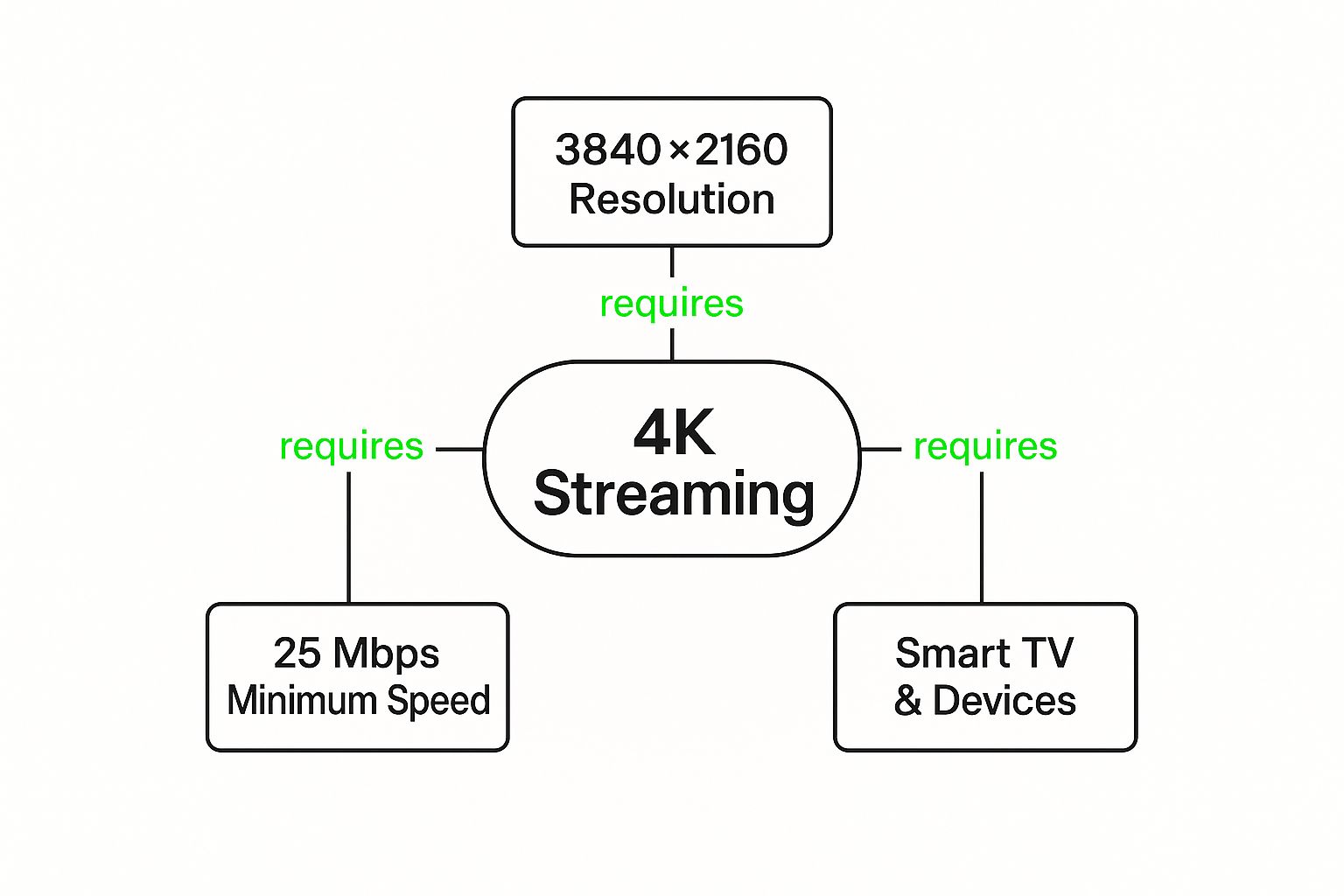
As you can see, getting true 4K streaming is a three-legged stool. If any one of those pieces—high resolution, solid bandwidth, or the right hardware—is missing, the whole experience falls flat.
To really put the jump in quality into perspective, take a look at how 4K stacks up against older resolutions.
| Resolution | Pixel Dimensions | Total Pixels | Common Name |
|---|---|---|---|
| Standard Definition | 720 x 480 | 345,600 | SD |
| High Definition | 1280 x 720 | 921,600 | HD / 720p |
| Full High Definition | 1920 x 1080 | ~2.1 Million | FHD / 1080p |
| Ultra High Definition | 3840 x 2160 | ~8.3 Million | UHD / 4K |
Seeing the numbers laid out like that really drives the point home. You're going from roughly 2 million pixels with 1080p to over 8 million with 4K. That's a ton of extra visual information, and it's what makes the picture so incredibly detailed and clear.

Knowing the numbers behind 4K is one thing, but actually getting that stunning, cinema-like quality into your living room? That takes the right gear. Don't worry, it's not complicated. Getting a flawless Ultra HD picture really comes down to just three key pieces working together.
To get your own 4K experience off the ground, you just need to focus on these essentials:
Think of it as a three-legged stool. If one leg is weak, the whole experience gets wobbly. Let’s break down exactly what you need for each part.
First things first, you absolutely need a 4K display. This could be a TV or a computer monitor, but the non-negotiable part is its native resolution of 3840 x 2160 pixels. Without that, you're just not seeing a true 4K image. Simple as that.
But resolution isn't the whole story. To really make your picture pop, make sure your TV supports High Dynamic Range (HDR). HDR is a game-changer, massively boosting the contrast and color to give you blindingly bright whites, inky deep blacks, and colors that look way more true to life.
Thankfully, these TVs are everywhere now. The global 4K TV market was valued at a whopping USD 268.67 billion in 2025 and is expected to blast past USD 513.88 billion by 2035. That's a clear sign of just how standard this tech has become. You can find more market insights over at researchnester.com.
A 4K TV without HDR is like a powerful sports car with economy tires—it has the potential for greatness, but you're missing a key component to unlock its best performance.
Next up is your internet connection. 4K video files are massive, and trying to stream them in real-time takes a lot of digital horsepower. The general rule of thumb is you need a bare minimum speed of 25 Mbps (megabits per second) for a smooth ride.
And keep in mind, that's 25 Mbps just for your stream. If you've got other people in the house gaming online, hopping on video calls, or downloading huge files, you'll need a beefier plan to keep everyone happy without the dreaded buffering wheel. Pro tip: a wired Ethernet connection straight to your device will almost always beat Wi-Fi for stability and speed.
Finally, you need a gadget that can take that 4K signal and push it to your screen. Lots of smart TVs have 4K apps built-in, which is convenient, but dedicated external devices often pack more punch and offer a bigger app library.
We're talking about popular choices like the Amazon Fire TV Stick 4K, Roku Ultra, and Apple TV 4K. These little boxes are built from the ground up for high-quality streaming and get regular updates to support the latest and greatest formats. If you want a deep dive into all the options, check out our complete streaming device comparison to find the perfect match for your needs.
So, is the jump to 4K really that big of a deal? The short answer is a definite yes, and it’s about way more than just numbers on a spec sheet. Making the switch turns watching TV from something you just do into a cinematic event that pulls you right into the middle of the action.
The first thing you’ll notice is the stunning clarity. With four times the pixels of regular 1080p HD, every single scene feels almost real enough to touch. On bigger screens, the difference is night and day; you'll see tiny details in the background, crisp textures, and a sense of depth that almost feels three-dimensional.
But hang on, it’s not just about getting a sharper image. 4K's best friend is a technology called High Dynamic Range (HDR), which completely changes the game for color and contrast. HDR gives you incredibly bright highlights and deep, dark blacks all in the same shot, making everything look way more vibrant and lifelike.
Think of it like this: standard TV is a pencil sketch and 1080p HD is a decent watercolor. 4K with HDR? That's like looking straight through a crystal-clear window. This one-two punch makes everything better, from high-speed sports to those epic nature documentaries.
Consistently delivering superior quality tells your audience that you take production seriously—and by extension, you value their time and attention. Higher resolution ensures the picture remains crisp and clear even on big displays.
All that extra detail and richer color create an experience you can really get lost in. You're not just watching a movie anymore; you're in it. This is exactly why a capable streaming device like the Amazon Fire TV Stick 4K becomes so important—it has the muscle to handle all that visual information without breaking a sweat.
At the end of the day, setting yourself up for 4K streaming is about getting your entertainment ready for the future. You’ll be prepared for the huge and growing library of UHD content, including live channels from premium services like IPTV Now, all enjoyed through a smooth, reliable player.
Having a shiny new 4K setup is awesome, but it's only half the story. The real fun begins when you start finding incredible content to watch on it. Luckily, the world of Ultra HD entertainment is bigger than ever and keeps growing. Think of this as your treasure map to the best 4K movies, shows, and live events out there.
Your first stop will probably be the big-name streaming services. Platforms like Netflix, Amazon Prime Video, and Disney+ have huge libraries packed with 4K goodness. There's just one little catch: you usually need to be on their premium subscription plan to unlock that crisp, clear Ultra HD quality. A quick search for "4K" or "UHD" inside their apps will show you everything they have to offer.
While the big guys are a great starting point, they're definitely not the only game in town. This is where IPTV services really shine, opening up a massive universe of content that often includes thousands of global channels, many broadcasting in pristine 4K.
Services like IPTV Now can give you a key to a world of entertainment you just won't find on standard platforms. This includes stuff like:
The appetite for high-quality video is absolutely exploding. To put it in perspective, the global video streaming market was valued at over USD 416.16 billion in 2025 and is expected to rocket to USD 2.47 trillion by 2035. This massive growth is what's fueling the fire, making more 4K content available everywhere.
Once you've got a great IPTV subscription, you need a simple way to manage and watch all those channels. Our free online IPTV player is the perfect tool for that. It lets you load your M3U playlist right in your web browser, no downloads or installations needed.
Think of an IPTV player as your personalized remote control for a world of entertainment. It takes thousands of streams and organizes them into a simple, searchable guide, putting endless 4K fun at your fingertips.
This approach puts you in the driver's seat. You can organize your favorite 4K channels, try out new playlists, and enjoy a smooth viewing experience without cluttering your device with extra software. To explore even more great sources, check out our guide on legal streaming websites.
While 4K feels like the peak of streaming quality right now, technology never sits still. On the horizon, we have 8K resolution, which packs in a mind-boggling four times as many pixels as 4K. The detail is truly something else.
But let's be real—8K content is still pretty hard to find. For now, it’s more of a cool "what's next" technology than something most of us can enjoy today.
The more exciting stuff is actually happening behind the curtain, focusing on making the high-res streaming we already love better and more reliable for everyone.
The real game-changer isn't just more pixels; it's smarter technology. We're talking about advanced video codecs, with AV1 (AOMedia Video 1) leading the pack.
Think of a codec as a super-clever way to shrink massive video files without losing quality. AV1 is so good at this that it can deliver crisp 4K or even 8K video using way less internet bandwidth than older tech.
This is a huge deal. It means you can get a clearer, more stable picture without needing to pay for the fastest internet plan available. It’s the key to making buffer-free Ultra HD streaming a reality for millions more people.
This push for better, more efficient quality is being driven by some serious money. The global 4K technology market was valued at an incredible USD 257.9 billion in 2025 and is expected to rocket up to USD 1596.9 billion by 2035.
That kind of explosive growth is what pushes companies to keep innovating. It guarantees that 4K isn't just a passing trend—it's the very foundation for everything we'll be watching for years to come. You can check out more stats on this incredible growth over at futuremarketinsights.com.
Jumping into the world of 4K can feel like learning a new language, and it’s natural to have a few questions. To help you get set up and streaming with total confidence, here are some straightforward answers to the things people wonder about most when they make the switch to Ultra HD.
You absolutely do. For the best, most reliable results, you’ll want a High-Speed HDMI 2.0 cable or a newer version. This is especially true if you're looking to enjoy content with HDR (High Dynamic Range), which adds that extra pop of color and contrast.
Think of it like a highway. Older HDMI cables just don't have enough lanes to handle the massive amount of data traffic a 4K signal creates. Using one can lead to annoying traffic jams like screen flickering, a complete loss of picture, or your TV getting stuck at a lower resolution.
To be safe, always look for cables that are certified as "Premium High Speed." This guarantees they can handle the job. The AmazonBasics High-Speed HDMI Cable is a solid, affordable choice that gets the green light.
Get ready, because 4K is hungry for data. On average, streaming 4K video chews through about 7 GB of data per hour. That's more than double what you’d use watching the same show or movie in standard 1080p HD.
If your internet service plan has a monthly data cap, you’ll need to keep a close eye on your usage. Binge-watching a few 4K movies can quickly gobble up your entire allowance and lead to surprise overage charges from your provider.
To keep things running smoothly, it helps to learn how to optimize your internet connection for streaming and maintain that buffer-free experience.
Key Takeaway: While 4K streaming looks incredible, it comes with a high data cost. Always be mindful of your internet plan's limits to avoid nasty surprise bills or throttled speeds.
This is a classic debate! While 4K streaming is incredibly convenient and looks fantastic, a physical 4K Ultra HD Blu-ray disc will generally give you a slightly superior picture and sound.
Why? It all comes down to data and compression. A Blu-ray disc can hold a massive amount of uncompressed information, while a streamed video has to be squished down a bit to travel over the internet.
However, for most people, the difference is very subtle. You’d likely only notice it on a very high-end home theater setup. Given the instant access to huge libraries offered by streaming and IPTV services from providers like IPTV Now, streaming is still the more popular and practical choice for enjoying 4K content day-to-day.
Ready to unlock a world of live 4K channels? The Free IPTV Player is the perfect tool for the job. Simply paste your M3U playlist link from a provider like IPTV Now and start watching instantly in your browser—no downloads required.
